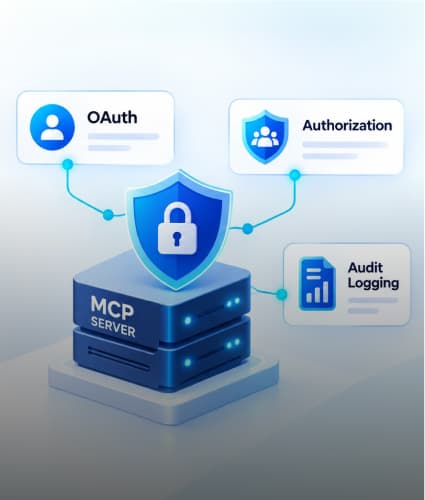


MCP servers are where AI agents meet your systems, so they need the same controls as any privileged API: strong authentication, narrow authorization, and a complete audit trail.
The Model Context Protocol (MCP) lets an agent call tools that read files, query databases, and create tickets (see AI agents vs MCP for the basics). That convenience is also the risk. An MCP server that is open, over-privileged, or unlogged hands a language model, and anyone who can influence it, a key to those systems.
The model cannot be your security boundary. It can be manipulated through prompt injection, so enforcement has to live in the server and the layers around it. This guide covers how to do that in an enterprise setting.
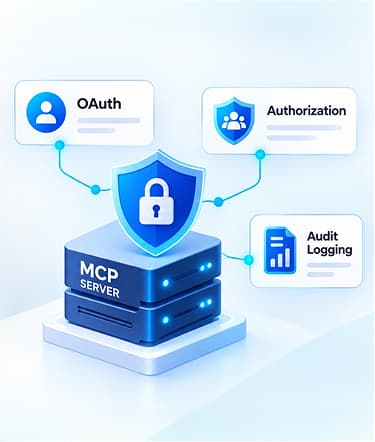
Authenticate with OAuth 2.1. The MCP server acts as an OAuth resource server, validates tokens from your identity provider, and accepts only tokens issued for it.
Authorize per user and per tool. Grant least-privilege scopes, check policy on the server, and require approval for risky actions.
Never pass tokens through. Use separate credentials, or a token exchange, for downstream systems.
Log every call. Record who called which tool, what was decided, and what happened, in storage people cannot quietly edit.
Why MCP Servers Need Enterprise-Grade Security
Three things make MCP servers different from an ordinary internal API. They hold real credentials to real systems. They take instructions that originate from a model, and so can be influenced by untrusted text. And they multiply, as every team can stand up its own.
The MCP authorization specification and the project's security guidance cover most of the threats below.
Threat | What it looks like | Main control |
|---|---|---|
Confused deputy | A proxy server uses its own broad authority for a requester who should not have it | Bind consent to each client and check the requesting user's rights |
Token passthrough | The server accepts a token not issued for it and forwards it downstream, skipping downstream controls | Validate token audience and never forward client tokens |
Prompt injection and tool poisoning | Untrusted content or a tool description steers the model into harmful calls | Server-side authorization, approvals and treating tool output as untrusted |
Over-broad scopes | One token allows everything, so one theft or mistake exposes everything | Minimal scopes, short-lived tokens and step-up for sensitive actions |
SSRF through metadata discovery | A client or server fetches attacker-supplied URLs during OAuth discovery and reaches internal endpoints | Allowlist issuers, restrict outbound requests and block private address ranges |
Session hijacking | A stolen or guessed session ID is used to impersonate a user | Validate a token on every request and never use a session as proof of identity |
Static secrets and unvetted servers | Long-lived tokens sit in config files, or a third-party server runs with your credentials | A secrets manager, a vetted server registry, and pinned versions |
Static tokens in config files are the most common starting point. Setup guides often use personal access tokens, as in our Figma MCP and Cursor walkthrough. That is fine for a developer laptop. It is not the pattern for a shared enterprise server.
Ready to Secure Your Enterprise MCP Servers?

OAuth 2.1 for MCP Servers: How Authentication Works
In the MCP authorization specification (revision 2026-07-28), a protected MCP server is an OAuth 2.1 resource server. It validates access tokens but does not issue them. Your identity provider, such as Microsoft Entra ID or Okta, stays the authorization server.
Two scope notes. The specification covers HTTP-based transports; for local STDIO servers, it says to take credentials from the environment instead. And it calls authorization optional for MCP implementations. For any remote server in an enterprise, treat it as required.
The Flow, Step by Step
Challenge. The client calls the server without a token and gets a 401 whose
WWW-Authenticateheader points to the server's protected resource metadata (RFC 9728).Discovery. The client reads that metadata, finds your authorization server, and fetches its metadata (RFC 8414 or OpenID Connect discovery).
Client identity. The client gets a client ID through Client ID Metadata Documents, pre-registration, or dynamic client registration. The specification marks dynamic registration as deprecated and kept for backward compatibility.
Sign-in and consent. The user signs in at your identity provider. The client uses the authorization code flow with PKCE and sends a resource parameter naming the MCP server (RFC 8707).
Token. The client validates the issuer in the response (RFC 9207) before exchanging the code for an access token.
Calls. The client sends the token in the
Authorization: Bearerheader on every request. It must never go in the URL query string.
The two responses your server has to get right look like this:
401 Unauthorized
HTTP/1.1 401 Unauthorized |
403 Forbidden
HTTP/1.1 403 Forbidden |
What Your Server Must Enforce
Audience. Accept only tokens issued specifically for this server, and reject all others. The specification says servers must not accept or pass on any other tokens.
Standard validation. Check signature, expiry, and issuer on every request.
Correct status codes. Return 401 for a missing, invalid, or expired token and 403
insufficient_scopewhen the token lacks the required permission.
Enterprise Decisions
Use your existing identity provider. You inherit single sign-on, multi-factor authentication, conditional access, and central revocation.
Pre-register approved clients. Decide which MCP clients may connect instead of allowing any client to register itself.
Give autonomous agents their own identity. An agent that acts on its own behalf, not a user's, can use the client credentials grant with a narrowly scoped identity of its own.
Authorization Beyond OAuth: Least Privilege for Every Tool
OAuth tells your server who is calling and which broad permissions were granted. It does not decide whether this user may run this tool with these arguments right now. That decision is your authorization layer, and it belongs on the server, not in the prompt.
Tier Your Tools by Risk
Not every tool deserves the same friction. Classify each one and attach a policy.
Tool tier | Example | Policy |
|---|---|---|
Read-only, low sensitivity | Search public docs, list open tickets | Allow within scope and log |
Read-only, sensitive data | Customer or HR records | Check the user's own entitlement, redact fields, and log in detail |
Reversible write | Create a ticket, update a draft | Allow within scope, rate limit and log |
Irreversible or high value | Send a payment, delete data, change permissions | Step-up consent plus human approval, with dual control where policy requires it |
Design Scopes Around Tools, Not Around the Whole System
Use narrow scopes such as tickets:read and tickets:write rather than one broad admin scope. The specification recommends least privilege and says the advertised scope list should cover only the minimal set for basic functionality, with more requested later through step-up. When a tool needs more, respond with 403 and insufficient_scope so the client can ask the user again.
Treat the Token Scope as a Ceiling, Not a Grant
A valid scope means the user may attempt a class of actions. Your server should still check the user's real entitlements in the downstream system, using role-based or attribute-based rules, on every call.
Do Not Forward the Client's Token
When the server calls a downstream API, it needs its own credential or a token obtained through OAuth token exchange, scoped to that API and that user. Forwarding the client's token bypasses the downstream system's controls and is the token passthrough pattern the specification forbids.
Assume the Model Can Be Manipulated
Take the user's identity from the validated token, never from tool arguments the model supplies.
Validate and allowlist arguments, and cap how much data a tool can return.
Treat tool descriptions and tool output from third-party servers as untrusted input.
Pin server versions and keep a vetted registry of approved servers.
Restrict the server's outbound network access and keep secrets in a secrets manager, not in config files.
Ready to Secure Your Enterprise MCP Servers?
Audit Logging for MCP Servers: What to Record and How to Protect It
When an agent does something unexpected, the first question is who did what, with which authority, and why it was allowed. Without a complete audit trail, you cannot answer it, and you cannot show auditors that your controls work.
Log every tool call as a structured event with these fields:
Field | Why it matters |
|---|---|
Timestamp (UTC) and request or trace ID | Lets you join MCP, gateway, and downstream logs into one story |
User identity and organization | Who the action was for |
Client ID | Which MCP client or agent application made the call |
MCP server and tool name | What was called |
Arguments, redacted or hashed | What was asked, without storing secrets or personal data |
Scopes granted and token ID, never the token | What authority was used |
Policy decision and reason | Allow, deny, step-up or approval required, and why |
Approver and approval time, where used | Accountability for high-risk actions |
Outcome: status, error, records affected, latency | What actually happened |
Source IP or network zone | Helps detect misuse |
Protect the Logs
Redact at the source. Strip secrets and personal data before the event is written, not after.
Make them tamper-resistant. Write to append-only or immutable storage, and keep access separate from the people who administer the MCP servers.
Centralize. Send events to your SIEM so security teams can search and correlate them with identity provider and network logs.
Set retention deliberately. Base it on your regulatory and internal requirements, and document it.
Alert on the Patterns That Matter
Spikes in denied calls or repeated
insufficient_scopeerrors.A new client ID connecting to a sensitive server.
High-risk tools used outside normal hours or at unusual volume.
Approvals that are always granted within seconds.
Logging is also how you improve authorization. Review which scopes and tools are never used and remove them.
Reference Architecture: A Secured MCP Gateway
Put the controls in one place. A gateway in front of your MCP servers, or a hardened server that does the same work, gives you one point to validate identity, apply policy, and record every call.
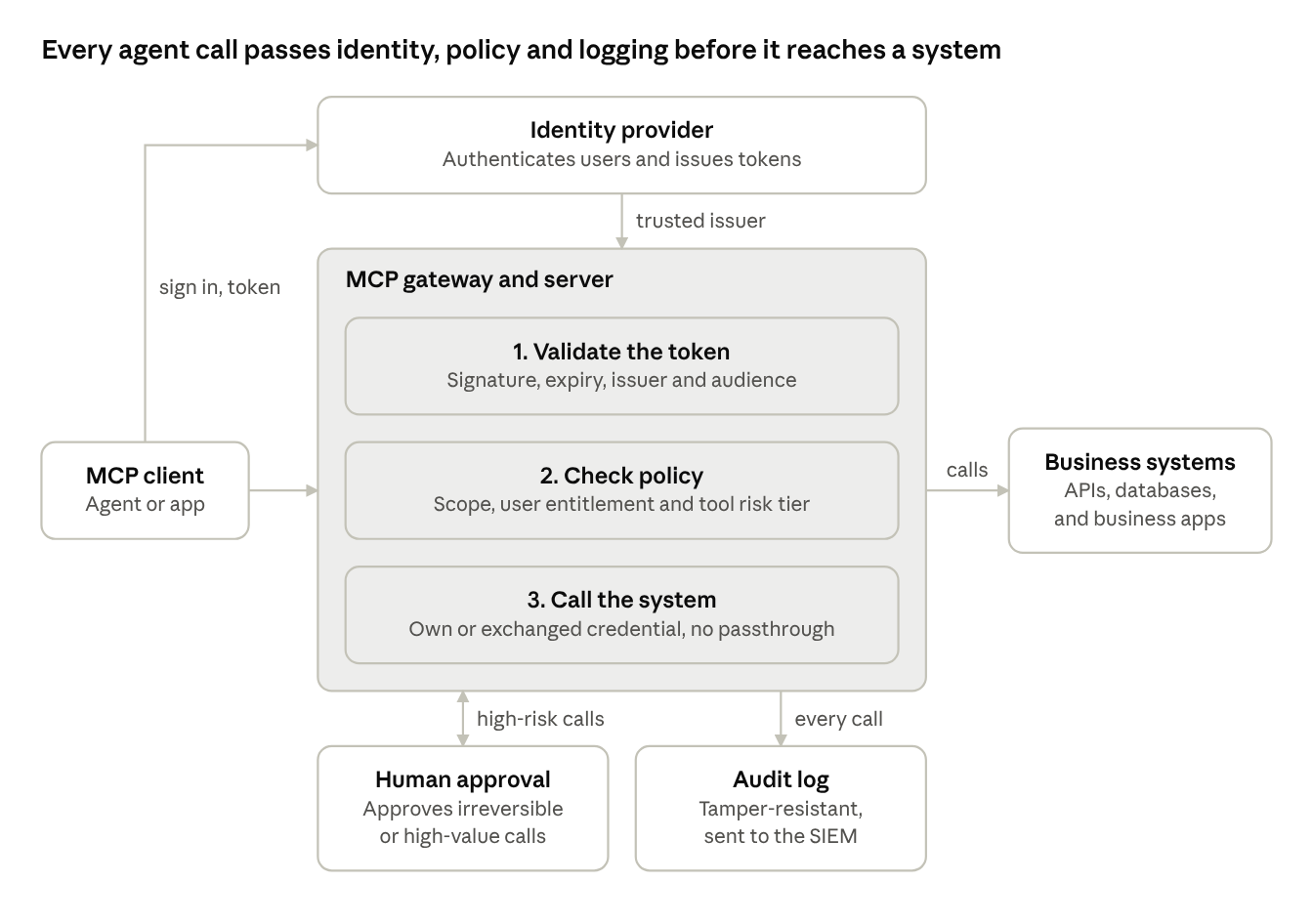
Secured MCP gateway · identity, policy, approval, audit log
The client signs in at your identity provider and receives a token. The gateway validates it, applies policy, calls the business system with its own credentials, and writes each decision to the audit log. High-risk calls wait for a person to approve them.
A shared gateway also makes review easier: teams can run their own servers behind it, and security sees every call in one log.
Ready to Secure Your Enterprise MCP Servers?
Enterprise MCP Server Security Checklist
Identity
Remote MCP servers require OAuth 2.1 with your corporate identity provider.
The server publishes protected resource metadata and answers unauthenticated calls with a 401 challenge.
Tokens are validated for signature, expiry, issuer, and audience on every request.
Only approved MCP clients can connect, and their client IDs are pre-registered.
Authorization
Every tool has a risk tier and a documented policy.
Scopes are narrow, and sensitive tools trigger step-up and human approval.
User entitlements are checked in the downstream system, not just in the token.
The server never forwards a client token; it uses its own or an exchanged credential.
Identity comes from the token, never from model-supplied arguments.
Operations
Secrets live in a secrets manager, not in config files.
Outbound network access is restricted, and server versions are pinned.
Every call is logged in a structured, redacted, tamper-resistant format and sent to the SIEM.
Alerts cover denial spikes, new clients, and high-risk tool use.
Servers are reviewed and re-tested whenever the MCP specification or your identity provider changes.
Conclusion: Treat MCP Servers Like Any Other Privileged API
MCP servers give agents real reach into your systems, so secure them the way you secure any privileged API. Authenticate with OAuth 2.1 through your identity provider, authorize per user and per tool, never pass tokens through, and log every call. Because the model can be manipulated, every one of these controls has to be enforced outside it.
Zignuts helps enterprises design, build, and secure MCP servers and the agents that use them, as an OpenAI, Anthropic (Claude), and AWS partner. Explore our agentic AI services, check where you stand with the AI readiness assessment, or request a project estimate.

Pruthvi Darji
A problem solver with a passion for building robust, scalable web solutions that push the boundaries of technology and deliver impactful results