
What Does Business Process Automation Consulting Include?
Think of automation as a way to coordinate work across people and systems, not simply as a script that clicks buttons. A well-designed workflow receives a request, checks whether required information is present, applies agreed rules, updates connected systems, assigns exceptions to a responsible person, and records the outcome. Consulting helps decide which steps should be removed, which should be standardized, which can be automated safely, and which still need human judgment.
Business Process Automation Services help organizations identify repetitive work, simplify processes, and choose technology to handle routine steps with less manual effort. The goal is not to automate everything. It is to make important workflows faster, clearer, and easier to manage while keeping people involved where judgment is needed.
Business Process Automation Consulting: Common Business Use Cases
Use cases are strongest when the work repeats often, the rules are understandable, and the organization can access reliable data. Before selecting a tool, write down the process start and finish, the systems involved, who owns each decision, what can go wrong, and how staff handle unusual cases today. This small discovery exercise often reveals whether the real problem is manual effort, unclear policy, poor data, or unnecessary handoffs.
Common Workflow | What Automation Can Improve |
|---|---|
Invoice processing | Capture information, check required fields, and route exceptions for approval. |
Employee onboarding | Coordinate forms, account requests, reminders, and completion status. |
Customer requests | Categorize requests, route them to the right team, and track response targets. |
Approvals | Apply clear rules, send requests to the right approver, and retain an audit trail. |
Reporting | Collect data from connected systems, run validations, and flag discrepancies. |
Ready to Automate Your Business Processes?

Business Process Automation Market Trends and Growth Outlook
Market forecast: Grand View Research estimates the global intelligent process automation market at USD 14.6 billion in 2024 and USD 18.5 billion in 2026.
Growth outlook: The market is forecast to reach USD 44.7 billion by 2030, representing a projected 22.6% CAGR for 2025–2030.
Market scope: These figures relate specifically to intelligent process automation, not the entire business process automation consulting market.
How to interpret the figures: Market forecasts indicate expected category growth, not guaranteed savings for an individual organization.
What businesses should measure: Prioritize your own baseline, including processing time, manual effort, exception rate, error and rework rate, and total cost.
Key takeaway: Market growth alone does not prove that a specific workflow will deliver a particular percentage or amount of savings. Use pilot results to assess its value.
Business Process Automation: Market and Adoption Statistics
These four charts add context without changing the guide’s concise structure. Market figures are estimates/forecasts; workforce figures come from Microsoft and LinkedIn’s 2024 survey and should not be interpreted as measured productivity gains or as current 2026 adoption rates.
Chart 1. Market outlook:
→ Estimated and forecast global intelligent process automation market size.
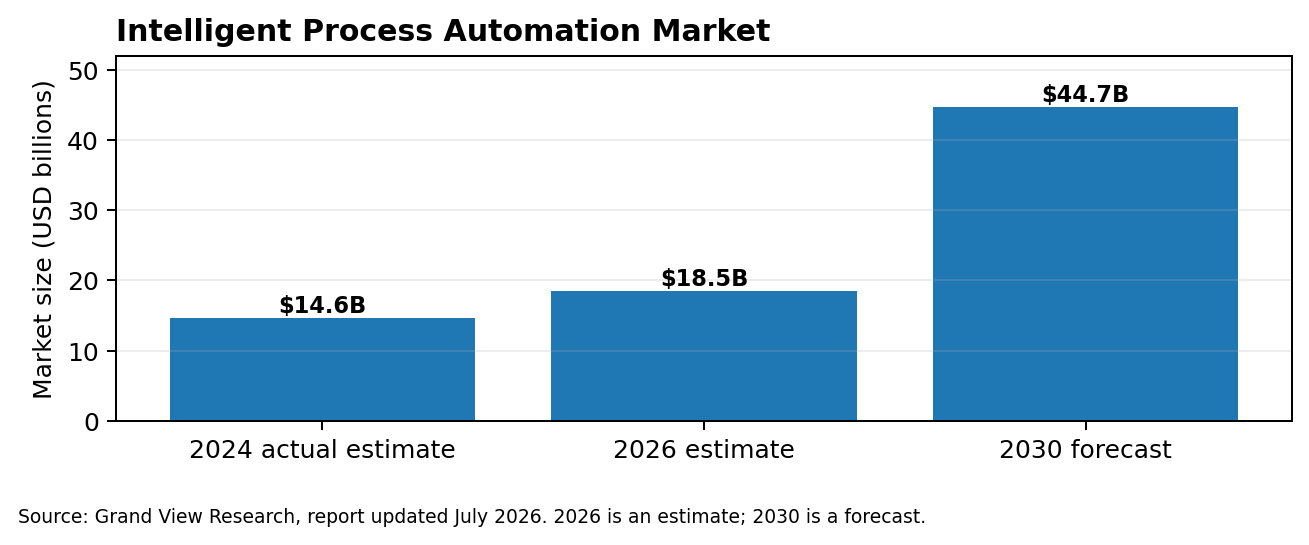
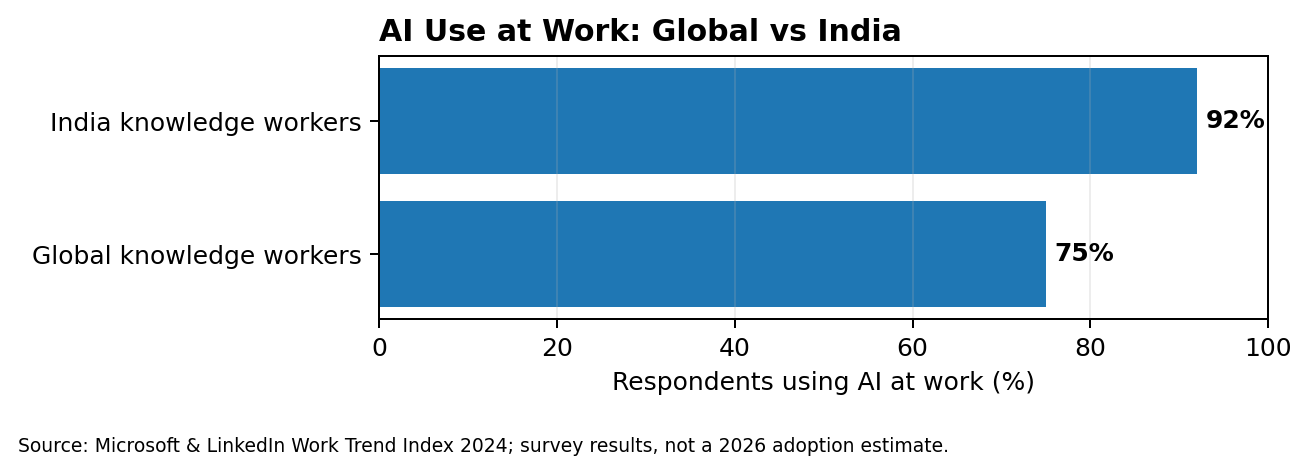
Chart 2. Comparison:
→ Reported workplace AI use among global and Indian knowledge workers in the 2024 survey.
Ready to Automate Your Business Processes?
Chart 3. Horizontal bar chart:
→ Leadership views on AI competitiveness, measuring gains and organizational readiness.
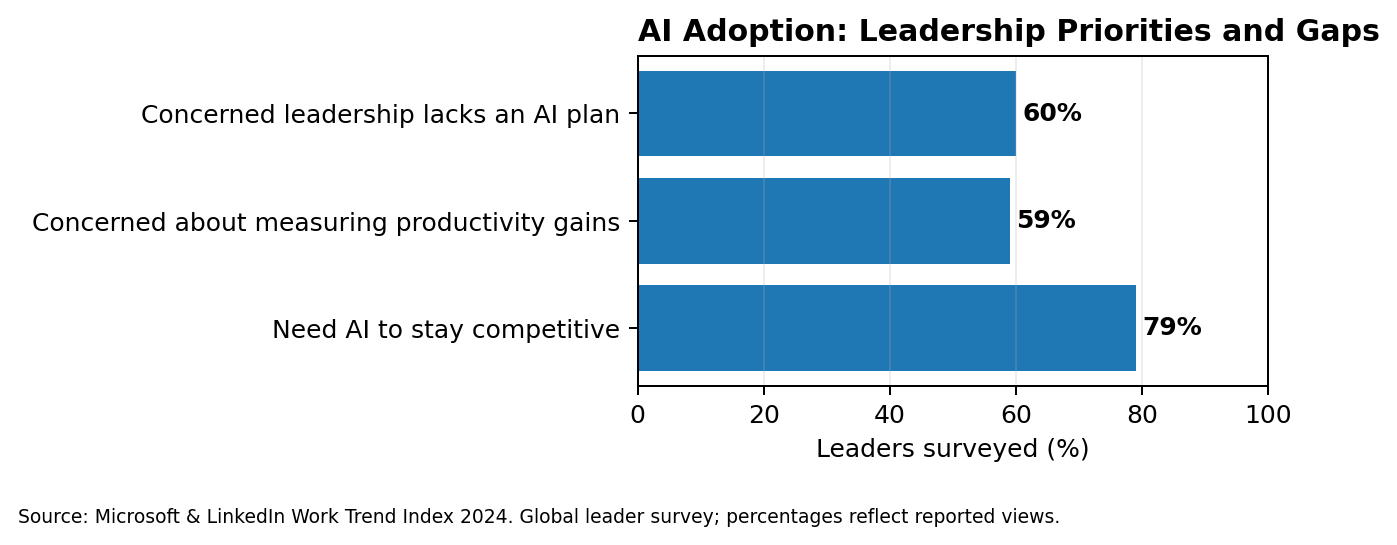
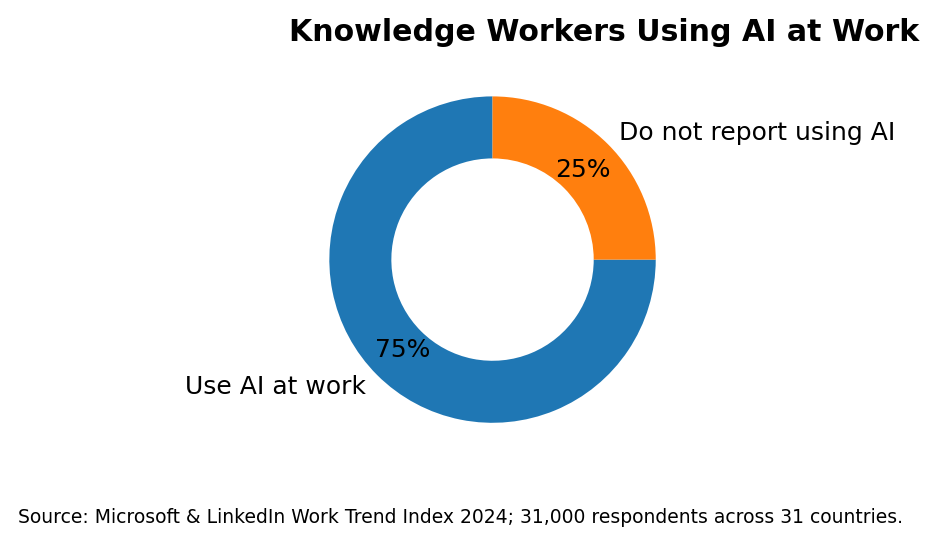
Chart 4. Donut chart:
→ Share of surveyed global knowledge workers who reported using AI at work.
Business Process Automation Consulting: From Process Discovery to Measurable Results
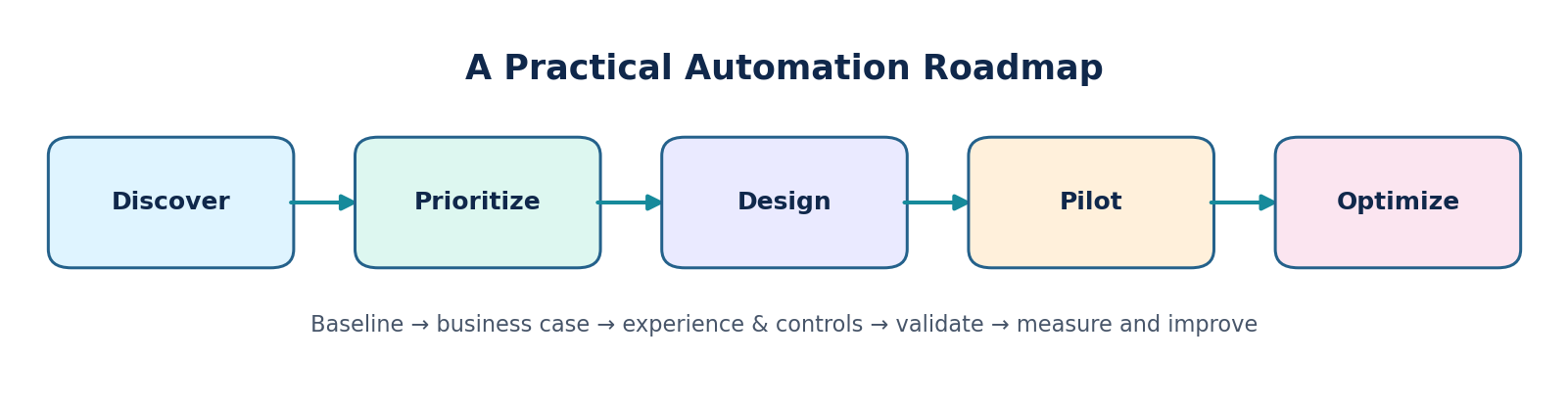
A lightweight delivery roadmap. Each stage should have an owner, a decision gate, and a measurable output.
Ready to Automate Your Business Processes?
Five Steps to Start a Business Process Automation Project
Each stage should produce a tangible deliverable. Discovery produces a current-state process map and baseline; prioritization produces a ranked shortlist with reasons; design produces a workflow, integration, and control plan; the pilot produces test evidence and measured results; optimization produces a backlog of fixes and a decision about whether to scale. A named business owner should approve each stage before additional scope is added.
Step | Action |
|---|---|
1. Understand | Map the current workflow and identify delays, duplicate entry, and common errors. |
2. Prioritize | Choose one process with measurable pain, stable rules, and manageable exceptions. |
3. Design | Simplify steps first, then define workflow states, integrations, permissions, and fallback paths. |
4. Pilot | Test normal cases and failure scenarios with the people who do the work. |
5. Improve | Track outcomes, fix exceptions, and expand only when the first workflow is reliable. |
User Experience Design for Effective Business Process Automation
Good UX reduces the effort required to understand a workflow. A reviewer should not have to open several screens to learn why a case is waiting, which information is missing, who owns it, or what action is expected. Present the status, important context, next action, and due date together. Use plain language rather than internal system codes, and make destructive or irreversible actions distinct from routine actions.
Treat the automation interface as a work queue, not just a form. Users should be able to answer three questions at a glance: What is the current status? What needs my attention? What happens next?
Automation succeeds when users understand what is happening and what they need to do next. UX should be designed into the workflow, not added after engineering.
Show status clearly: Use plain-language labels such as “Needs review,” “In progress,” and “Completed.”
Make the next action obvious: Highlight the owner, due date, and primary action without clutter.
Design useful exception states: Explain what failed, why it matters, and how to resolve it.
Reduce unnecessary input: Prefill known data, validate fields inline, and ask only for information needed at that step.
Keep people in control: Make approvals, overrides, and escalation paths visible for high-impact decisions.
Design for accessibility and responsive layouts: Use readable type, sufficient contrast, keyboard support, and mobile-friendly forms.
Build trust: Show when an automated action occurred and provide a clear history where users need traceability.
User Experience Checklist for Business Automation Workflows
UX Element | Good Practice |
|---|---|
Page hierarchy | One clear page title, a short explanation, and a prominent primary action. |
Forms | Group related fields, mark required fields, preserve entered data, and give specific error messages. |
Tables and queues | Support search, filters, sorting, and clear empty/loading/error states. |
Notifications | Make alerts actionable; avoid duplicate or vague notifications. |
Responsive design | Prioritize the core task on small screens and avoid wide, dense tables where possible. |
Ready to Automate Your Business Processes?
Business Process Automation Architecture: Key Components
A typical automation architecture connects an input, such as a form, email, scheduled task, or API, to a workflow engine. The engine applies business rules, communicates with connected systems through integrations, and tracks each step, including its status and any exceptions. Monitoring, access controls, and audit records help keep the entire workflow secure, reliable, and easy to manage.
When reviewing the design, consider both the normal workflow and situations where something goes wrong. Test states such as loading, no results, access denied, validation errors, integration timeouts, retries, and completion with warnings. Clear feedback and recovery options help users understand what is happening and what to do next.
How to Choose the Right Business Process Automation Technology
Select technology only after clarifying process complexity, integration access, audit requirements, scale, team skills, and long-term ownership. A workflow platform can be suitable for approvals and visible case states; APIs are usually preferable for stable system-to-system exchange; RPA can bridge a legacy interface when no practical integration exists; AI can assist with variable documents or free text when outputs can be validated. A hybrid solution may be appropriate, but each additional component increases monitoring and support needs.
Option | Best Fit |
|---|---|
Workflow platform | Approvals, routing, and multi-step processes that need visibility. |
API integration | Reliable communication between systems that expose supported APIs. |
RPA | Legacy software where a practical API or integration is unavailable. |
AI-assisted automation | Document extraction or text classification where rules alone are insufficient; use validation and human review. |
A common mistake is choosing a tool before understanding the process. Prefer the simplest approach that meets the business, security, and support requirements.
How to Measure Business Process Automation Performance and Return on Investment
Define the measurement method before the pilot starts. For example, compare a representative baseline period with a similar post-launch period, segment by case complexity, and record changes in volume or policy. Track speed and quality together: a shorter cycle time is not a success if exceptions, rework, or customer complaints increase. Separate realized cash savings from capacity released for other work, and include implementation and ongoing operating costs.
Define ownership before launch. The process owner decides policy and acceptable exceptions; the technical owner maintains integrations and reliability; operations or support owns triage and escalation. For every failure, show the user a useful message, preserve entered work where safe, and provide a recovery path.
Before implementation, record a small baseline. After launch, compare results over a similar period.
Cycle time: How long a case takes from start to completion.
Manual effort: How much active human time each case needs.
Exception rate: How often a person must intervene.
Error and rework rate: How often work needs correction.
User experience: Whether employees and customers can complete the process with less confusion.
Do not assume that time saved automatically becomes cash savings. Include licensing, implementation, integration, support, and change-management costs when evaluating ROI.
A simple business case can compare the baseline with the pilot across five measures: median completion time, active staff minutes per case, first-pass completion rate, exception volume, and total cost per completed case. Review the measures together so that faster processing does not hide a rise in errors or manual rework.
Ready to Automate Your Business Processes?
Business Process Automation: A Practical Example
An invoice workflow might receive an invoice, check required details, match it to a purchase order, route exceptions to an employee, and record the final approval. A good experience shows the current status, the reason for any exception, the responsible person, and the next action. The workflow should retain a manual fallback if a connected system is unavailable.
Invoice Approval Automation: A Realistic Business Workflow Example
Imagine invoices arrive by email and employees manually enter their details into an accounting system. Before selecting an OCR tool, map the entire process and identify the main causes of delays, such as missing purchase-order references, duplicate invoices, unclear approval limits, or slow responses. An initial workflow could capture invoice details, validate required fields, check for duplicates, match invoices against purchase orders where available, and route mismatches to a review queue.
The review screen should display the supplier, invoice amount, matching result, reason for any exception, assigned reviewer, and next action. The workflow should not approve an invoice automatically when information is incomplete or a control check fails. If the accounting system becomes unavailable, it should preserve the case, retry safely, and notify the responsible person if the retry limit is reached.
Before launch, define measures such as median processing time, the percentage of invoices completed without manual correction, duplicate-detection results, exception volume, and total cost per completed invoice. Start with a controlled pilot, review false matches and missed exceptions with finance users, and expand only when the workflow and its controls are r
Conclusion: Build a Smarter Business Process Automation Strategy
Successful business process automation starts with understanding how work gets done today. By identifying repetitive tasks, simplifying workflows, choosing the right technology, and designing clear approval and exception-handling processes, organizations can reduce manual effort and improve operational visibility. Measuring cycle time, accuracy, exception rates, and overall costs helps ensure that automation delivers meaningful results over time.
Every business has different workflows, systems, and operational priorities. A well-planned approach helps ensure that automation fits existing processes, supports the people using it, and can adapt as business needs change. If you're planning to streamline workflows or connect business systems, contact us today to discuss your requirements and explore the right approach for your automation project.

Hard Trivedi
Business Enthusiast | Exploring ideas, understanding business challenges, and turning insights into practical solutions that create meaningful value and growth.