


Visual search has moved from a novelty feature to a core capability in modern mobile applications. In 2026, users expect apps to understand images as naturally as they understand text or voice. Whether it's identifying products, translating text in real time, scanning documents, or recognizing objects, visual search is reshaping how users interact with mobile apps.
In this comprehensive guide, we’ll break down what visual search is, why it matters, and, most importantly, how to implement it effectively using Flutter.
1. What is Visual Search?
Visual search is a technology that allows users to search using images instead of text. Instead of typing “red sneakers,” users can upload or capture an image, and the system identifies objects, patterns, or similar items.
At its core, visual search combines:
Computer Vision (CV) – understanding image content
Machine Learning (ML) – classifying and predicting patterns
Deep Learning Models – extracting high-level features
Example Use Cases:
E-commerce: Find similar products from a photo
Travel: Identify landmarks
Healthcare: Scan reports or detect anomalies
Social apps: Filter or tag images
2. Why Visual Search Matters in 2026
The rise of visual search is tied to broader advancements in AI systems that can analyze and synthesize large volumes of multimodal data. Tools like OpenAI’s deep research systems demonstrate how modern AI can interpret text, images, and structured data together for deeper insights.
Key Trends Driving Adoption:
Camera-first interactions
Real-time processing on-device
Edge AI and on-device ML (TensorFlow Lite, Core ML)
Visual commerce boom
Multilingual and accessibility use cases
Users increasingly prefer showing instead of telling. That’s why visual search is becoming a competitive advantage.
3. Visual Search Architecture (Mobile Apps)
Before diving into Flutter, let’s understand the typical pipeline:
Visual Search Flow:
Image Input
Camera capture or gallery upload
Preprocessing
Resize, normalize, compress
Feature Extraction
CNN model (e.g., MobileNet, EfficientNet)
Inference
On-device or API-based prediction
Post-processing
Ranking, similarity matching
Results Display
UI rendering in app
Hire Mobile Developers Today!

4. Flutter’s Role in Visual Search
Flutter is ideal for building visual search apps because of:
Cross-platform support (iOS + Android + Web)
Fast UI rendering (Skia engine)
Strong plugin ecosystem
Easy integration with ML frameworks
Key Flutter Capabilities:
Camera access (camera plugin)
Image processing (image, tflite_flutter)
ML integration (Firebase ML, TensorFlow Lite)
REST APIs for cloud-based inference
5. Core Technologies You’ll Use
5.1 Camera Integration
5.2 Image Picking (Gallery)
5.3 TensorFlow Lite Integration
6. Approach 1: On-Device Visual Search (Recommended)
Why On-Device?
Faster (low latency)
Works offline
Better privacy
Popular Models:
MobileNet
EfficientNet Lite
YOLO (for object detection)
Flutter Workflow:
Capture image
Convert image to tensor
Run model locally
Display predictions
Example: Image Classification Pipeline
7. Approach 2: Cloud-Based Visual Search
If your model is large or needs continuous updates:
Options:
Firebase ML Kit
AWS Rekognition
Google Vision API
Custom backend (Node/Python)
Flutter API Call Example:
Pros vs Cons
Approach | Pros | Cons |
|---|---|---|
On-device | Fast, private | Limited model size |
Cloud-based | Powerful models | Latency, cost |
8. Building a Visual Search UI in Flutter
Key UI Components:
Camera preview
Image upload button
Result grid/list
Confidence scores
Sample UI Layout:
Hire Flutter Developers Today!
9. Advanced Features to Add
9.1 Reverse Image Search
Compare embeddings:
9.2 Object Detection (Bounding Boxes)
Use models like YOLO or SSD:
9.3 Text Recognition (OCR)
Use:
Google ML Kit Text Recognition
Tesseract
Flutter plugin:
9.4 Visual Search + AI Assistants
Combine visual search with conversational AI:
“What is this product?”
“Find cheaper alternatives.”
Modern systems can combine multimodal reasoning, an approach highlighted in advanced research systems that analyze text, images, and documents together.
10. Performance Optimization in Flutter
Tips:
Use isolates for heavy processing
Compress images before inference
Cache results
Use batching for API calls
Example: Using Isolate
compute(runInference, inputData);
11. Security & Privacy Considerations
Visual search apps handle sensitive data (images). Always:
Use HTTPS
Avoid storing images unnecessarily
Encrypt local storage
Follow GDPR/DPDP regulations
12. Real-World Use Cases (Flutter Apps)
1. E-Commerce App
Snap a product → find similar items
2. Food Recognition App
Identify dishes → show recipes
3. Travel Guide App
Scan landmark → show details
4. Document Scanner
OCR → extract text
13. Challenges in Visual Search
1. Accuracy Issues
Lighting, angles, occlusion
2. Model Size Constraints
Mobile devices have limits
3. Latency
Especially in cloud-based systems
4. Data Bias
Poor training data leads to bad predictions
14. Future of Visual Search (2026 and Beyond)
Visual search is evolving toward:
Multimodal AI (image + text + voice)
Agentic systems that act on visual input
AR + Visual Search (real-time overlays)
Edge AI with powerful on-device models
Systems capable of deep reasoning across multiple data types are already emerging, enabling more intelligent and context-aware visual experiences.
15. Step-by-Step Flutter Implementation Plan
Phase 1: MVP
Camera + gallery input
Simple classification model
Phase 2: Enhancement
Add object detection
Improve UI
Phase 3: Scaling
Backend integration
Search indexing
Phase 4: Advanced AI
Multimodal assistant
Personalized recommendations
16. Choosing the Right Tech Stack for Flutter Visual Search
Selecting the right combination of tools is critical for building a scalable and efficient visual search app in Flutter. The decision often depends on your app’s complexity, performance needs, and budget.
Recommended Stack (2026)
Frontend (Flutter):
Flutter SDK (latest stable)
State management: Riverpod / Bloc
Camera & image handling plugins
On-device ML:
TensorFlow Lite (tflite_flutter)
MediaPipe (for real-time vision tasks)
Backend (Optional):
Node.js / Python (FastAPI)
Firebase / Supabase for quick deployment
Cloud Vision APIs (if needed):
Google Vision API
AWS Rekognition
Decision Matrix
Use Case | Best Approach |
|---|---|
Offline apps | TensorFlow Lite |
Real-time detection | MediaPipe |
Large-scale image search | Cloud APIs |
Hybrid apps | On-device + Cloud mix |
👉 Pro Tip: Start with on-device inference and scale to cloud only when necessary.
17. Testing & Debugging Visual Search in Flutter
Testing visual search apps is more complex than standard mobile apps because you're dealing with ML models, image inputs, and probabilistic outputs.
Key Testing Strategies
1. Unit Testing (Model Logic)
Validate preprocessing pipeline
Ensure correct tensor shapes
2. Integration Testing
Camera → Model → UI flow
API response validation
3. Real-World Testing
Different lighting conditions
Various device cameras
Edge cases (blur, noise, occlusion)
Debugging Tips
Log model outputs (confidence scores)
Save intermediate processed images
Use mock APIs for faster iteration
Monitor inference time
Example: Logging Predictions
Performance Benchmark Targets (2026)
Inference time: < 100 ms (on-device)
API response time: < 500 ms
Accuracy: 85%+ (baseline)
Hire Mobile Developers Today!
18. Monetization Strategies for Visual Search Apps
Once your Flutter visual search app is live, the next step is turning it into a sustainable product.
1. E-commerce Integration
Affiliate product linking
Commission-based sales
Visual shopping experiences
Example: User scans shoes → app shows buy links
2. Subscription Model
Offer premium features like:
Unlimited scans
High-accuracy models
Faster processing
Cloud-enhanced results
3. API-as-a-Service
If your visual search engine is strong:
Provide APIs to other developers
Charge per request or subscription
4. In-App Ads (Careful Use)
Reward-based ads (for extra scans)
Minimal intrusive banners
5. Enterprise Solutions
Retail analytics
Inventory management
Healthcare imaging tools
Monetization Strategy Comparison
Strategy | Best For | Revenue Potential |
|---|---|---|
E-commerce | Consumer apps | High |
Subscription | SaaS-style apps | Very High |
API | Developer platforms | Scalable |
Ads | Free apps | Moderate |
Enterprise | B2B solutions | Very High |
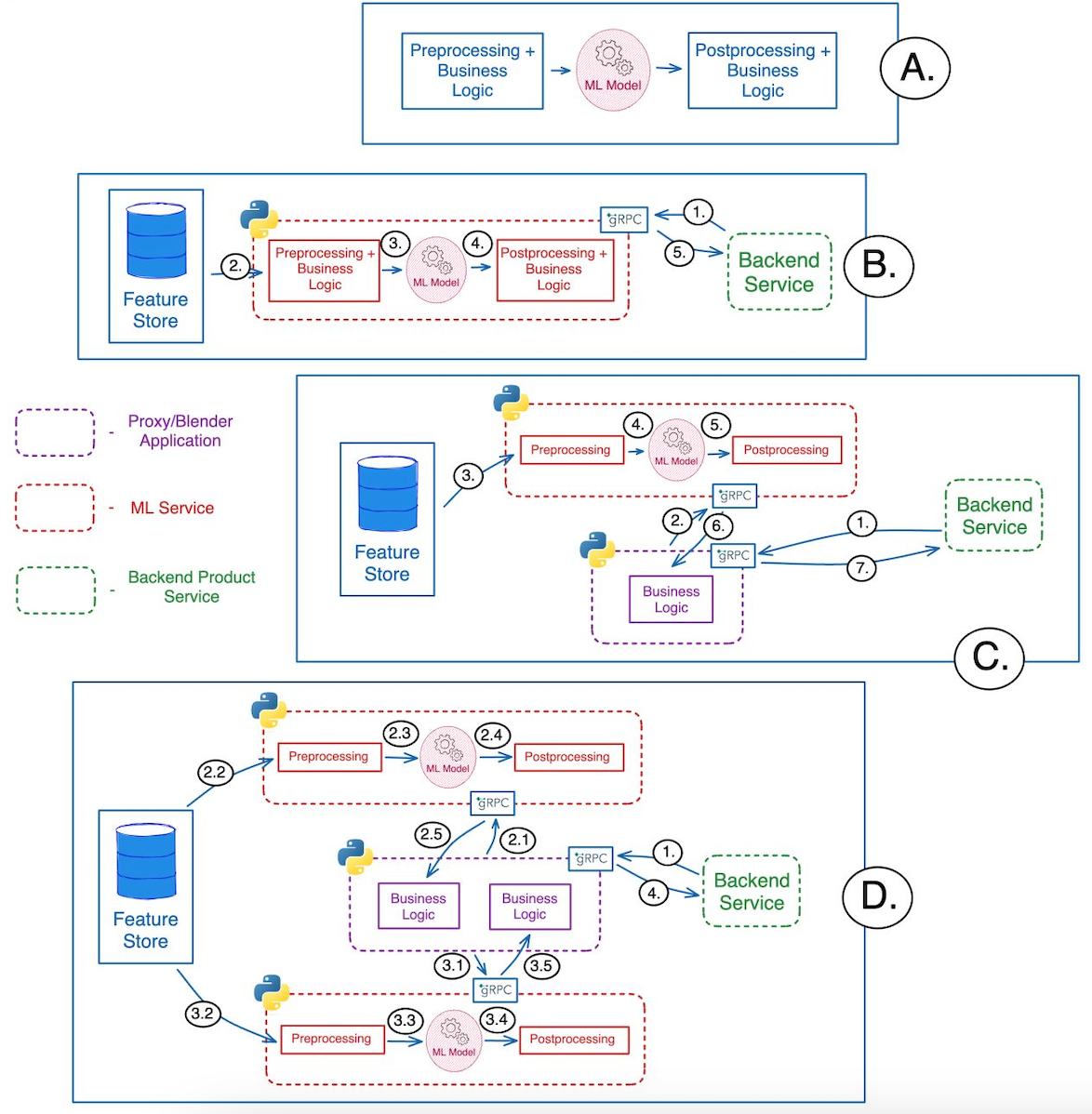
19. Visual Search Architecture Diagrams (Flutter)
19.1 Flutter + TensorFlow Lite (On-Device Architecture)
This is the recommended architecture for performance and privacy.
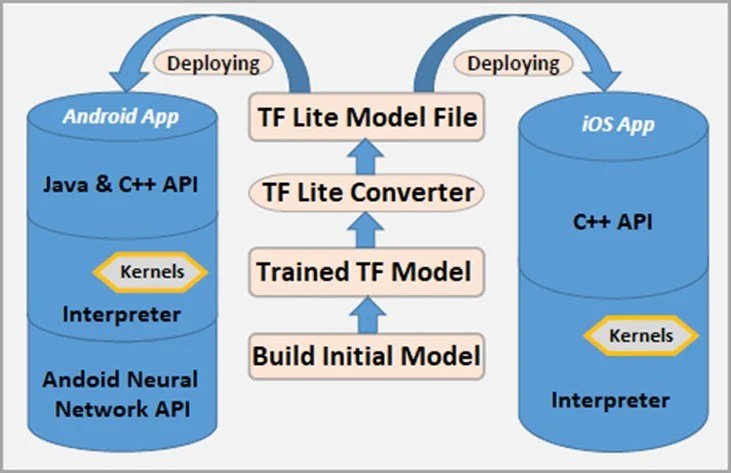
Breakdown:
Flutter Layer
UI (Widgets)
Camera plugin
Image processing
ML Layer (On Device)
TFLite Interpreter
Model (.tflite file)
Input/Output tensors
Data Flow
Camera → Image → Preprocessing → TFLite → Output → UI
Benefits:
Ultra-fast inference
No data leaves device
Works offline
19.2 Hybrid Architecture (On-Device + Cloud)
Best for scalable and production-grade apps.
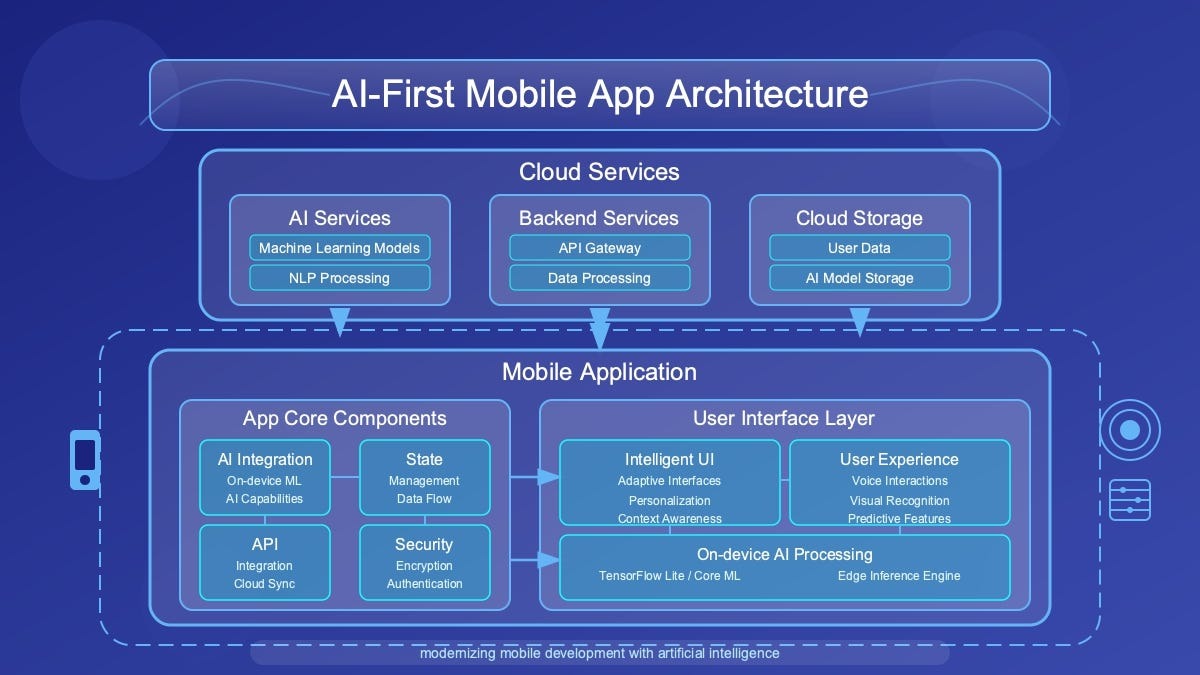
Flow Explanation:
Step 1 (Local Check)
Run lightweight model on-device
Step 2 (Fallback to Cloud)
If confidence is low → send to API
Step 3 (Cloud Processing)
Heavy model (YOLO, ResNet, etc.)
Database matching
Step 4 (Response)
Return enriched results
Hybrid Logic Example (Flutter)
19.3 Component-Level Flutter Architecture
This diagram helps developers structure production apps.
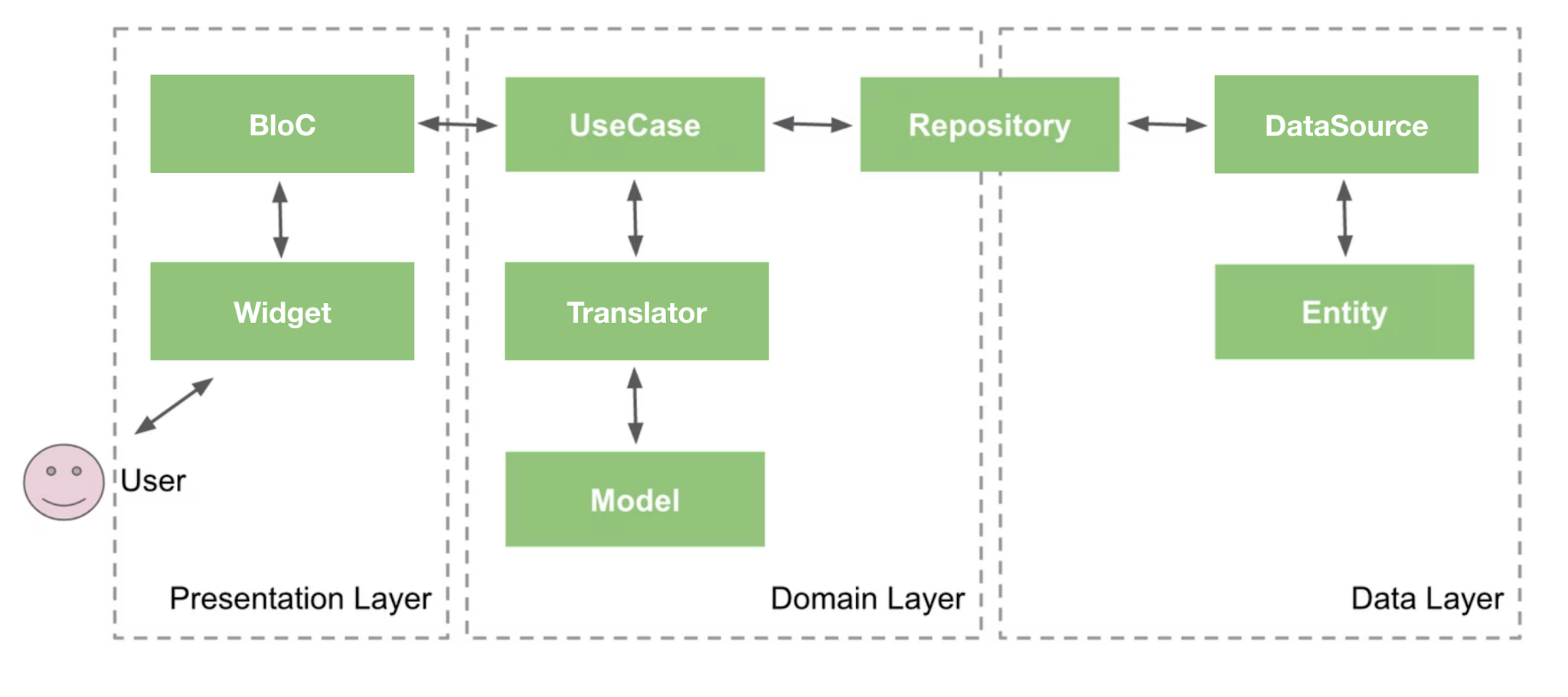
Recommended Structure:
Presentation Layer
UI Widgets
State Management (Bloc / Riverpod)
Domain Layer
Use cases (DetectObject, SearchImage)
Data Layer
Repository
ML Service (TFLite / API)
Hire Flutter Developers Today!
20. Final Thoughts
Visual search is no longer optional; it’s becoming a standard feature in modern apps. Flutter provides a powerful and flexible platform to build these experiences quickly and efficiently.
By combining:
Flutter UI
TensorFlow Lite
Cloud APIs
Smart UX
You can create intelligent, real-time visual search applications that feel futuristic yet practical.
The next generation of apps won’t just respond to what users type , they’ll understand what users see. And with Flutter, you’re fully equipped to build that future.

Navin Panchal
A technology enthusiast focused on crafting intuitive and high-performing mobile solutions that enhance everyday experiences.

Sameer Ashra
Developer focused on creating user-friendly applications and improving system performance. Committed to continuous learning and helping others through technical writing.