



Knowledge Management Platform Development: Overview and Key Considerations
Knowledge management platform development helps organizations make business knowledge easier to find, access, maintain, and use in everyday workflows. A successful platform combines enterprise search, source integrations, metadata, access controls, content lifecycle management, and, where appropriate, AI-powered retrieval and answer generation.
Architecture and technology decisions: Evaluate platform architecture, retrieval methods, and whether to buy, extend, or develop a custom solution. Compare existing Knowledge Management Solutions against business needs before choosing an approach.
Security, governance, and integration: Preserve access permissions, maintain source attribution, manage content updates and deletions, and establish clear ownership and lifecycle policies.
Implementation and performance measurement: Start with a defined business workflow, test retrieval quality using representative queries, and validate security, content freshness, usefulness, and operating costs through a focused pilot before expanding to more teams and systems.
Why Knowledge Management Platform Development Starts With Business Needs
A knowledge platform succeeds when people can find the right, current, authorized information in the moment they need it. That outcome depends on more than a search box: source connectivity, ownership, metadata, access controls, retrieval quality, content lifecycle, and user workflow all matter.
AI can make organizational knowledge easier to discover and use, but it does not remove the fundamentals. Organizations should define how employees will use the platform, identify authoritative information sources, and establish clear governance and access policies before choosing AI models or retrieval technologies. A knowledge platform should be designed around measurable workflow needs rather than treating an AI interface as the entire product.
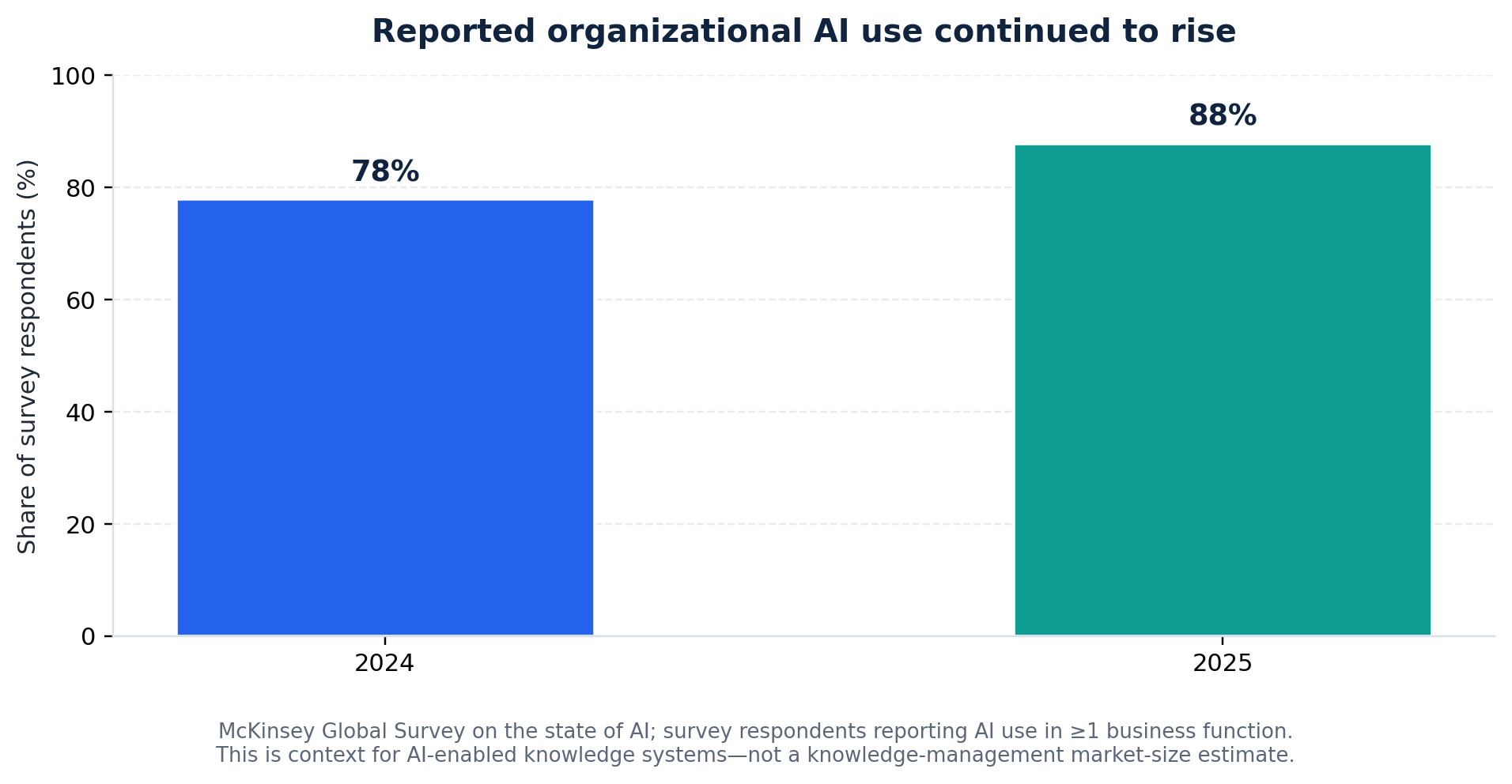
Figure 1. Key considerations for AI adoption in knowledge management, including source integration, access
Ready to Build a Smarter Knowledge Platform?

What a Successful Knowledge Management Platform Should Deliver
Do not measure success by whether a chatbot can produce a fluent answer. Measure whether the platform retrieves the right source, respects access, shows provenance, handles uncertainty, and fits the employee’s real task.
Core Capabilities of a Knowledge Management Platform
A knowledge management platform combines people, process, and technology to capture, organize, preserve, retrieve, and improve organizational knowledge.
The software may include:
A knowledge base
Enterprise search
Content authoring
Taxonomy and metadata
Collaboration
Analytics
Where justified, AI-assisted question answering
ISO 30401 describes requirements and guidance for establishing, implementing, maintaining, reviewing, and improving a knowledge management system.
The standard is useful as a management-system lens: technology should support clear ownership and continual improvement, not replace them.
ISO lists ISO 30401:2018 as published and indicates that a revised draft, ISO/DIS 30401, is under development; check the current status before claiming formal alignment or certification.
Capability | What It Enables | Design Question |
|---|---|---|
Knowledge capture | Create or ingest procedures, decisions, FAQs, lessons, and policies | Who owns the content and what triggers review? |
Taxonomy & metadata | Classify by topic, product, role, geography, sensitivity, and validity | Which metadata is mandatory versus inferred? |
Search & discovery | Keyword, filters, semantic retrieval, and recommendations | What does “relevant” mean for each task? |
Workflow & collaboration | Review, approve, comment, version, and retire content | Which changes require human approval? |
AI assistance | Summaries, grounded answers, and source discovery | When should the system abstain or escalate? |
Governance & analytics | Permissions, audit trail, freshness, usage, and quality monitoring | Who can act on quality or access alerts? |
Types of Knowledge Management Platforms and Their Use Cases
Internal knowledge hub: Curated policies, onboarding, SOPs, product knowledge and employee self-service.
Enterprise search layer: A unified discovery experience across existing repositories without migrating every file into one store.
Domain knowledge platform: Controlled content and workflows for a function such as support, engineering, compliance, or clinical operations.
AI-enabled knowledge assistant: Retrieval-backed answers with citations, permission checks, and a safe fallback when evidence is weak.
These shapes can coexist. Choose the smallest product boundary that solves a measurable problem; avoid building a new repository when a permission-aware search layer over existing systems would meet the need.
Ready to Build a Smarter Knowledge Platform?
Define Knowledge Workflows Before Platform Development
Discovery should identify the decisions and tasks people struggle to complete, then trace the information needed to complete them. Interview both content producers and consumers; observe real searches; review failed queries, duplicate documents, support escalations, and onboarding questions.
Discovery Area | Questions to Answer | Useful Output |
|---|---|---|
Users & jobs | Who needs what knowledge, at which point in a workflow? | Personas and top tasks |
Sources | Where does authoritative content live? Which systems own it? | Source inventory and owner map |
Quality | What is duplicated, stale, incomplete, or contradictory? | Content-quality baseline |
Access | Which roles, teams, tenants, or regions can see each item? | Permission model and exception list |
Success | What observable behavior should improve? | Baseline KPIs and evaluation set |
Operations | Who reviews, updates, retires, and audits content? | RACI and lifecycle policy |
How to Choose the Right Knowledge Management Pilot
Pick one high-friction workflow with a clear owner and a bounded set of trusted sources, for example, support agents finding current troubleshooting guidance. Capture representative queries and expected source documents before selecting a model or vector database.
Knowledge Management Platform Architecture and Data Flow
A robust platform separates source connectivity, content processing, indexes, query orchestration, user experience, and cross-cutting governance. The exact components depend on the source estate, data sensitivity, latency needs, and whether answers are generated by an LLM.
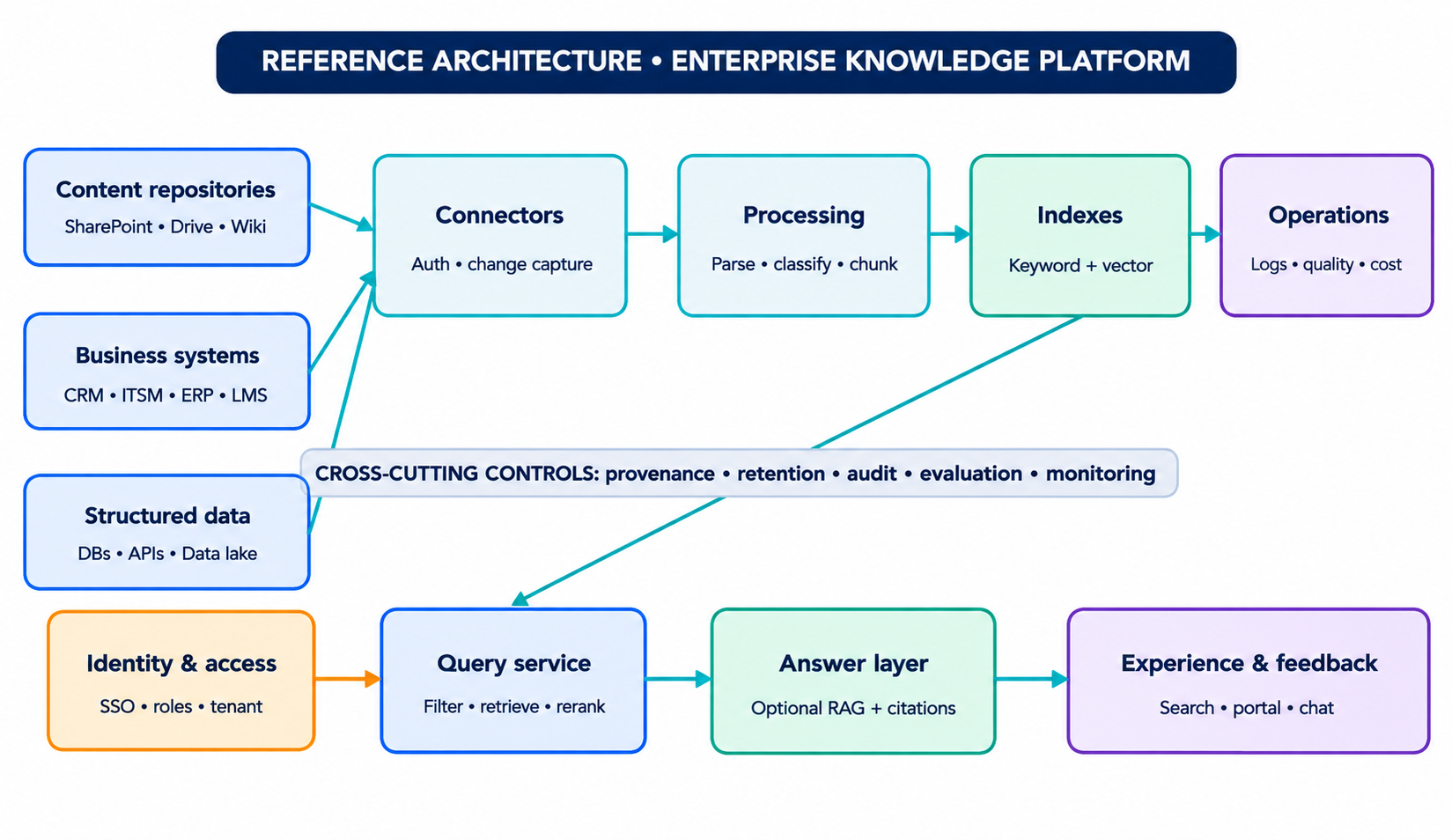
Figure 2. Illustrative reference architecture. Component boundaries are conceptual; this is not a claim about Zignuts’ deployed systems.
Core Architectural Layers of a Knowledge Management Platform
Experience layer: Portal, enterprise search, embedded search, chat, or APIs. Make citations, filters, and feedback available where the work happens.
Identity and policy layer: Authenticate users, resolve roles/groups, and establish tenant or organizational context before retrieving content.
Retrieval layer: Query parsing, keyword/semantic/vector retrieval, metadata filtering, access filtering, ranking, and optional reranking.
Knowledge processing layer: Connectors, parsing, OCR where required, chunking, metadata enrichment, deduplication, and index updates.
Source and system layer: Content repositories and operational systems remain authoritative where possible; store stable source IDs and links.
Operations layer: Logs, traces, audit events, freshness monitoring, retrieval evaluation, model evaluation, cost tracking, and incident response.
Prefer a modular monolith or managed platform for an early product unless independent scaling, team ownership, deployment cadence, or isolation requirements justify distributed services. Microservices add network failure modes, observability needs, deployment coordination, and operational overhead; they are not a default synonym for scalability.
Ready to Build a Smarter Knowledge Platform?
Search, Semantic Retrieval, and Retrieval-Augmented Generation
Retrieval-augmented generation (RAG) retrieves relevant content from a knowledge source and supplies it to a language model as grounding context. The model can then compose an answer based on retrieved evidence and cite source material. RAG can improve relevance for private or frequently changing information, but it does not guarantee truth: poor source quality, missed retrievals, incorrect permissions, and unsupported generation remain possible.
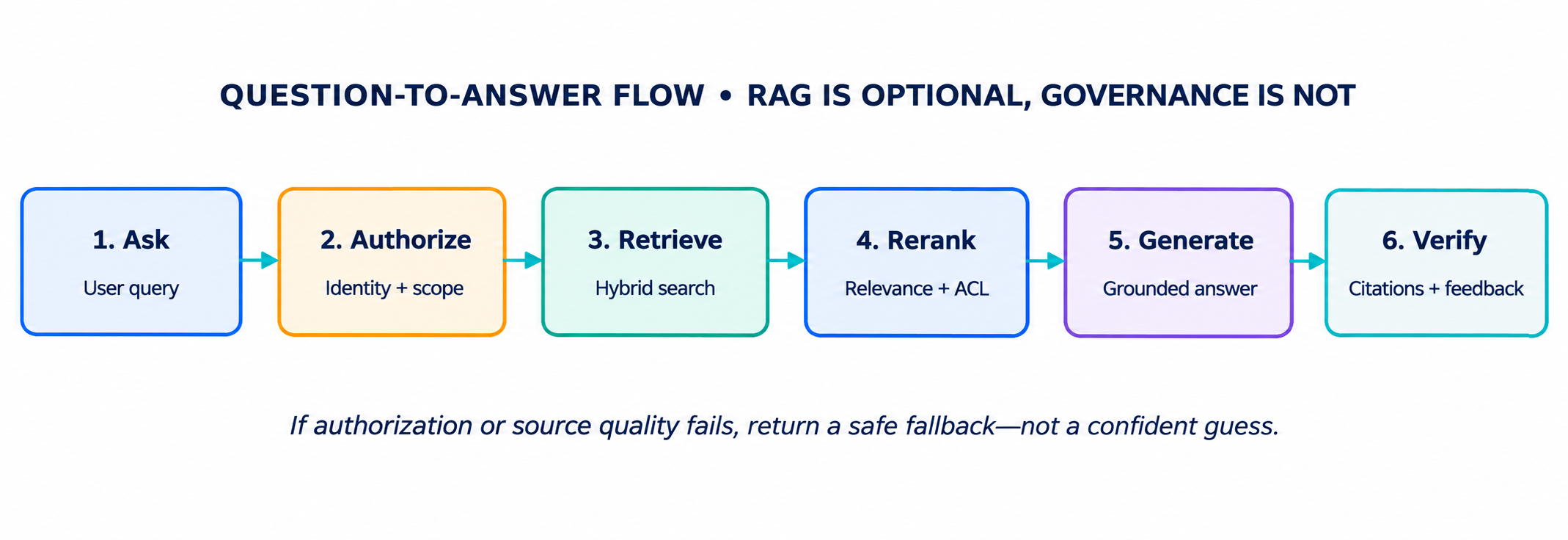
Figure 3. Query-to-answer flow. Authorization and evidence checks belong in the path, not as optional post-processing.
Approach | Best Fit | Trade-offs / Guardrails |
|---|---|---|
Keyword search | Exact names, IDs, error codes, legal phrases | Fast and interpretable; weaker on paraphrases and conceptual similarity |
Semantic/vector search | Natural-language questions and concept matching | Depends on embeddings, chunking, and relevance evaluation; can miss exact tokens |
Hybrid retrieval | Mixed enterprise queries combining terms and intent | Requires tuning and a clear ranking strategy; often a strong starting point |
RAG answer generation | Questions needing synthesis across retrieved sources | Adds model cost/latency and hallucination risk; requires citations and abstention |
Agentic/multi-step retrieval | Complex questions requiring query decomposition or several sources | More orchestration, latency, and cost; restrict tools and autonomy |
Microsoft’s retrieval guidance describes keyword, semantic, vector, and hybrid indexes and emphasizes grounding and source references. AWS documents retrieval and retrieval-plus-generation patterns with source citations. Google Cloud also explains RAG as combining retrieval with generation. These are vendor implementation references, not proof that one cloud is universally superior.
Best Practices for Designing Enterprise Knowledge Retrieval
Start with representative queries and a labelled set of expected documents; include exact-match, ambiguous, multi-hop, no-answer, and restricted-content cases.
Keep source identifiers, title, owner, last-updated time, URL, sensitivity, and access metadata with each indexed item or chunk.
Use hybrid retrieval when queries contain both natural-language intent and exact identifiers; evaluate whether reranking materially improves relevance.
Return citations to source documents or passages. Make it easy to open the original and report stale or incorrect content.
Use a threshold and safe fallback: ask a clarifying question, show search results, or say evidence is insufficient rather than fabricating an answer.
Treat model prompts and retrieved documents as untrusted input; test prompt injection, data leakage, and unauthorized retrieval.
Key Architecture Decisions for Knowledge Management Platform Development
Decision | Choose the Simpler Option When | Increase Complexity When |
|---|---|---|
Buy vs build | A managed product covers most workflows, permissions, and integrations | Differentiating workflows, deep integrations, or control needs cannot be met by configuration |
Central repository vs federated search | A small, curated domain needs one governed source | Knowledge is already distributed, and systems of record must remain in place |
Relational vs vector storage | Metadata, workflow state, and transactional integrity dominate | Semantic similarity is a retrieval requirement; vector storage complements rather than replaces transactional data |
Modular monolith vs microservices | One team, shared release cadence, and moderate scale are expected | Independent scaling, deployment, ownership, or fault isolation has demonstrated value |
RAG vs fine-tuning | Facts change often, and answers must cite private sources | The need is primarily behavior/style/task adaptation, not access to fresh facts |
Managed AI vs self-hosted | Speed, managed operations, and service capabilities fit requirements | Data residency, model control, cost predictability, or offline constraints justify the operating burden |
Ready to Build a Smarter Knowledge Platform?
Build vs. Buy: Choosing the Right Knowledge Management Solution
If existing tools meet search, permissions, workflow, and audit requirements, configure or extend them first.
If the gap is primarily cross-repository discovery, evaluate a federated search layer or supported connectors before copying content.
If the workflow is strategically unique or requires domain-specific controls, prototype the narrowest custom layer that closes the gap.
Before committing, run a proof of value against real queries, real permissions, and representative documents; include total cost of ownership and exit options.
How to Choose the Right Technology for Your Knowledge Platform
A vector database, microservices, an agent framework, or a custom model is not a goal. Add each only when evaluation shows that it solves a defined requirement better than the simpler alternative.
Knowledge Management Platform Security, Governance, and Trust
Security must follow knowledge from source to answer. A platform that retrieves a confidential document and then asks an LLM not to reveal it has already failed at the authorization boundary. Apply access controls before or during retrieval, preserve source permissions where feasible, and re-check access when the underlying source changes.
Control | Implementation Guidance | Evidence to Test |
|---|---|---|
Identity & SSO | Use the enterprise identity provider; map groups and roles deliberately | Joiner/mover/leaver and revoked-session tests |
Document-level access | Preserve ACLs or apply reliable security filters at retrieval time | User A cannot retrieve or infer User B’s restricted documents |
Tenant isolation | Scope queries, caches, indexes, and logs to the correct tenant | Cross-tenant negative tests |
Data lifecycle | Track source, owner, retention, expiry, and deletion propagation | Deleted/expired content disappears from all indexes and caches |
AI safety | Limit tools, validate outputs, defend against prompt injection and sensitive disclosure | Adversarial test suite and red-team findings |
Auditability | Log identity, query, retrieved IDs, model/version, and action where lawful | Reconstruct a disputed answer without exposing unnecessary PII |
Resilience | Backups, restore tests, rate limits, fallback search and incident runbooks | Recovery exercise and dependency-failure test |
Microsoft’s Azure AI Search documentation describes permission metadata and security-trimming patterns, while Microsoft Graph connector documentation explains that external items carry content, properties, and access-control lists.
Exact capabilities and maturity vary by product and API version; verify current service status, limitations, and licensing before designing around a preview feature.
For AI risk governance, NIST’s AI Risk Management Framework organizes work around Govern, Map, Measure, and Manage.
Use this as a lifecycle lens: assign accountability, document intended use and impact, measure quality and risk, then monitor and respond.
OWASP’s GenAI security project maintains a risk taxonomy for LLM applications; use the current official version when building threat models and test plans.
Risk | Typical Failure | Practical Mitigation |
|---|---|---|
Prompt injection | Instructions embedded in retrieved content manipulate a model or tool | Treat retrieved text as data; isolate system instructions; constrain tools; test adversarial documents |
Sensitive disclosure | Answer reveals data outside the caller’s permissions | Enforce ACLs before generation; minimize context; test indirect inference and logs |
Hallucination | Plausible answer lacks support in retrieved evidence | Citations, grounded prompts, confidence thresholds, abstention and evaluation |
Stale knowledge | Old policy or procedure outranks current content | Owner, effective date, version, expiry and re-indexing SLA |
Unbounded cost | Long prompts, broad retrieval or agent loops inflate spend | Token and retrieval budgets, caching where safe, rate limits and cost telemetry |
Ready to Build a Smarter Knowledge Platform?
Knowledge Platform Integration and Content Lifecycle Management
Integrations are not finished when a connector can read a file. Production readiness requires incremental sync, deletion propagation, retries, rate-limit handling, schema mapping, source attribution, permission synchronization, and operational ownership.
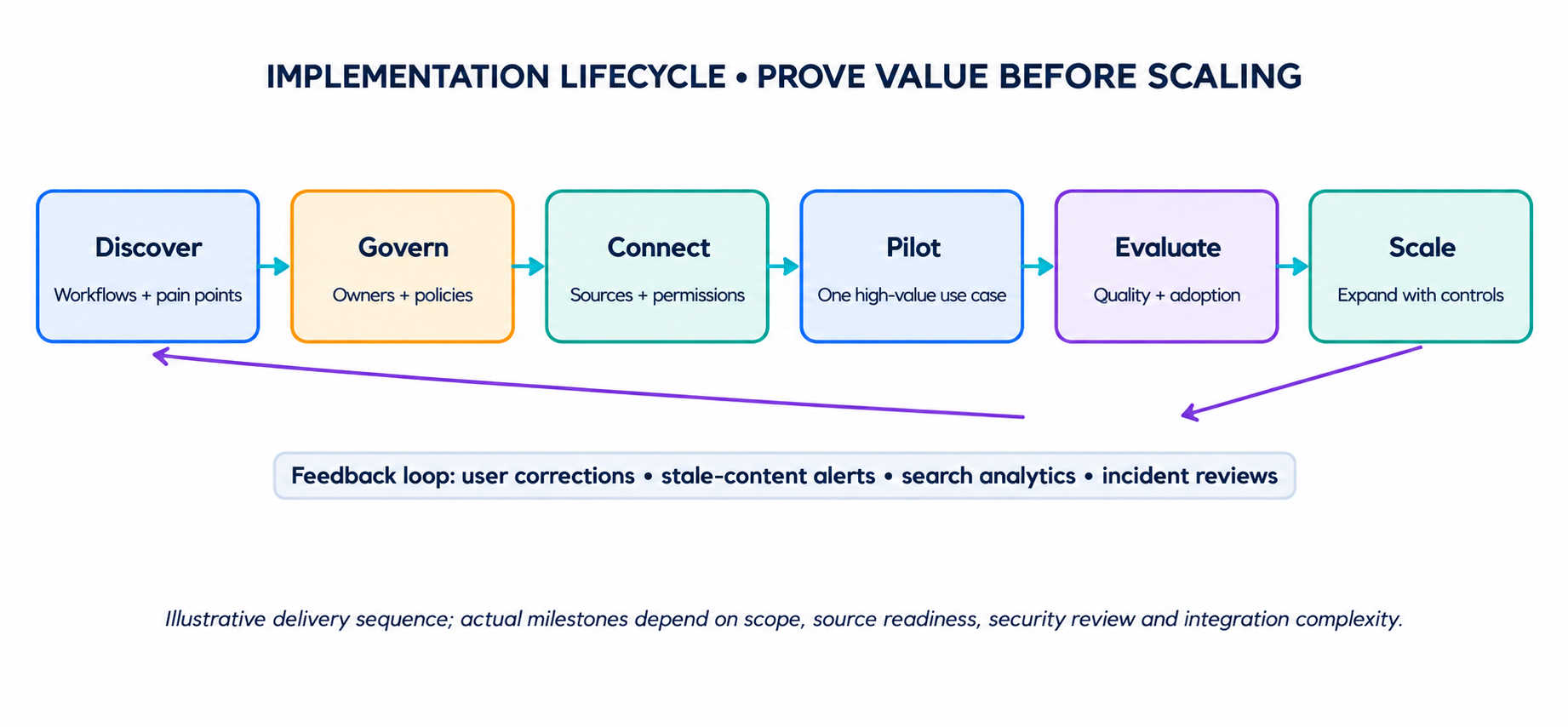
Figure 4. Illustrative delivery lifecycle. Pilot quality and governance before expanding source count.
Lifecycle Stage | Required Behavior | Failure to Avoid |
|---|---|---|
Connect | Use least-privilege credentials, connector health checks, and source IDs | One broad admin credential with no rotation plan |
Ingest | Handle incremental changes, pagination, throttling, and retries | Reprocessing everything on every run without controls |
Normalize | Extract text, preserve headings/tables, classify and chunk contextually | Arbitrary fixed-size chunks that split important meaning |
Index | Store searchable fields, source links, ACLs, and version metadata | Indexing content but dropping permissions or provenance |
Refresh | Detect updates/deletions and reconcile failed syncs | Stale copies surviving after source deletion |
Review | Route low-quality, sensitive, or unowned content for action | Treating every ingested file as authoritative |
A useful source registry records the system owner, connector owner, sync method, expected freshness, credentials, permission model, failure alert, data classification, and deletion behavior. Start with the most valuable sources rather than connecting every repository on day one.
Knowledge Management Platform Development Roadmap and Success Metrics
A staged delivery plan reduces risk by proving source quality, permission correctness, and user value before expanding. The timeline should be estimated only after the team knows the number and complexity of sources, identity model, data volume, compliance requirements, and acceptance criteria.
Phase | Primary Work | Exit Evidence |
|---|---|---|
1. Discover | Workflow interviews, source inventory, risk assessment and baseline | Agreed pilot, owner, queries, and success measures |
2. Design | Architecture, data model, permissions, integration contracts and threat model | Reviewed design and test strategy |
3. Prove | Connect a small source set; implement search/retrieval and evaluation harness | Measured relevance, access-control and freshness results |
4. Pilot | Embed in a real workflow; train users; capture feedback and failure cases | Adoption signal and prioritized defect list |
5. Harden | Load/security tests, observability, backup/restore and operational runbooks | Release gates met and support ownership assigned |
6. Scale | Add sources and use cases based on evidence; tune cost and quality | Source-by-source readiness and recurring governance review |
How to Measure Knowledge Platform Performance and Business Value
Metric | Definition / Measurement Approach | Why It Matters |
|---|---|---|
Search success rate | Share of sampled sessions where users reach a useful result | Measures task-level discoverability |
Time to find | Median elapsed time from query to useful source or answer | Captures friction more directly than raw search volume |
Retrieval precision/recall | Evaluate retrieved passages against a labelled query set | Separates search quality from fluent generation |
Grounded-answer rate | Share of generated answers supported by cited evidence under a defined rubric | Tests whether AI responses are evidence-based |
Permission leakage rate | Unauthorized documents returned or exposed in test cases | Security release gate; target should be zero in tests |
Content freshness | Share of priority content within its review or sync SLA | Reduces stale guidance |
Resolution/deflection | Workflow-specific outcomes, such as support tickets resolved without escalation | Connects knowledge use to an operational outcome |
Cost per successful task | Retrieval, model, infra, and support cost divided by successful tasks | Supports sustainable scale |
Set targets after collecting a baseline and agreeing the measurement method. Do not use a generic industry percentage as a promised ROI target. Pair quantitative measures with user interviews and periodic content-owner reviews.
Ready to Build a Smarter Knowledge Platform?
Knowledge Management Platform Development Costs and Risks
The total cost of ownership includes more than initial development. Costs typically come from integration complexity, content cleanup, identity and permissions, parsing/OCR, search infrastructure, embedding and model inference, evaluation, monitoring, security reviews, support and ongoing governance.
Cost Driver | What Changes the Cost | Control Lever |
|---|---|---|
Source integrations | API quality, auth patterns, rate limits, number of systems | Prioritize sources; reuse connector patterns; agree SLAs |
Content quality | Scanned PDFs, tables, duplicates, conflicting versions, languages | Pilot representative content; define cleanup ownership |
Retrieval infrastructure | Corpus size, query load, indexing frequency, reranking | Benchmark workload; right-size tiers; track utilization |
AI generation | Model choice, prompt size, retrieved context, retries and traffic | Set token budgets; cache safe results; compare smaller models |
Security & compliance | Sensitivity, audit, retention, residency and access complexity | Threat-model early; preserve existing controls where feasible |
Operations | Monitoring, incident coverage, evaluation and content review | Automate routine checks; assign clear service ownership |
Common Risks in Knowledge Management Platform Development
Starting with a chatbot instead of defining a measurable user task and source-of-truth policy.
Indexing content before mapping permissions, retention, ownership, and deletion behavior.
Using a single benchmark question set that over-represents easy queries and ignores no-answer cases.
Treating retrieval quality, model quality, and user adoption as one metric; diagnose each separately.
Overengineering the first release with agents, complex microservices, or custom models before simpler retrieval has been evaluated.
Failing to budget for content stewardship, source drift, connector maintenance, and ongoing evaluation.
Ready to Build a Smarter Knowledge Platform?
Knowledge Management Platform Use Cases and Vendor Evaluation by Industry
Industry / Function | Knowledge Needs | Additional Design Constraints |
|---|---|---|
Financial services | Policies, product terms, procedures, audit guidance | Strong access boundaries, traceability, retention and review controls |
Healthcare | Clinical protocols, operational policies, training content | Sensitive-data minimization, role-aware access, provenance and clinical governance |
Manufacturing | SOPs, maintenance manuals, engineering changes | Version/effective-date control, plant or equipment context, offline resilience where needed |
Retail & hospitality | Store playbooks, product information, customer-service guidance | Fast mobile access, regional variants, frequently changing operational content |
Professional services | Project methods, reusable deliverables, proposals, lessons learned | Client confidentiality, matter-level access, reuse policy and metadata discipline |
EdTech & HR | Curriculum, onboarding, policies, learning resources | Age-appropriate or employee data controls, localization and content-owner workflows |
Knowledge Management Platform Vendor Evaluation Scorecard
Evaluation Dimension | Questions for Shortlist | Suggested Evidence |
|---|---|---|
Search quality | Can it find exact and semantic matches on our corpus? | Blind test set with expected documents |
Permissions | Does retrieval respect our real group and document ACLs? | Negative access tests, not slideware |
Integration | Can it sync updates/deletions and handle failures? | Connector demo plus failure/recovery test |
Governance | Can we trace source, owner, version, and answer evidence? | Audit walkthrough and stale-content scenario |
AI safety | How are injection, disclosure, uncertainty, and unsupported answers handled? | Red-team results and abstention tests |
Operations | What monitoring, restore, support, and exit paths exist? | Runbooks, SLA, export and deletion demonstration |
Economics | What are fixed and usage-based costs at realistic load? | Transparent model with stated assumptions |
Ask vendors to demonstrate your own representative queries and access scenarios. A polished demo using curated documents is not sufficient evidence of enterprise readiness.
Knowledge Management Platform Development: Key Takeaways
Design around a real knowledge task and trusted sources, not a feature checklist.
Preserve identity, permissions, provenance, and deletion behavior throughout the retrieval pipeline.
Start with keyword/semantic/hybrid search; add RAG or agentic retrieval only when evaluation supports it.
Treat content ownership, review, and lifecycle as product capabilities.
Measure retrieval, answer quality, security, freshness, adoption, and cost separately.
Pilot narrowly, test negative cases, and scale only after evidence shows the solution is useful and safe.
Conclusion: Building a Knowledge Platform Around Business Needs
A successful knowledge management platform brings together the right information, reliable integrations, strong security, and a user experience that fits everyday workflows. AI can make organizational knowledge easier to find and use, but its value depends on retrieving relevant information, respecting access permissions, and providing reliable, well-supported answers.
Building the right platform starts with understanding your business needs, identifying trusted information sources, and defining clear requirements for security, content freshness, and retrieval quality. If you're planning to build or improve a knowledge management platform, contact us today to discuss your requirements and explore an approach that aligns with your goals.

Hard Trivedi
Business Enthusiast | Exploring ideas, understanding business challenges, and turning insights into practical solutions that create meaningful value and growth.