

Enterprise Intelligent Document Processing Services: Executive Overview
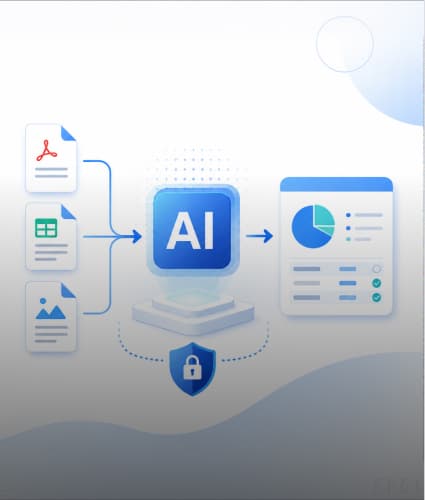
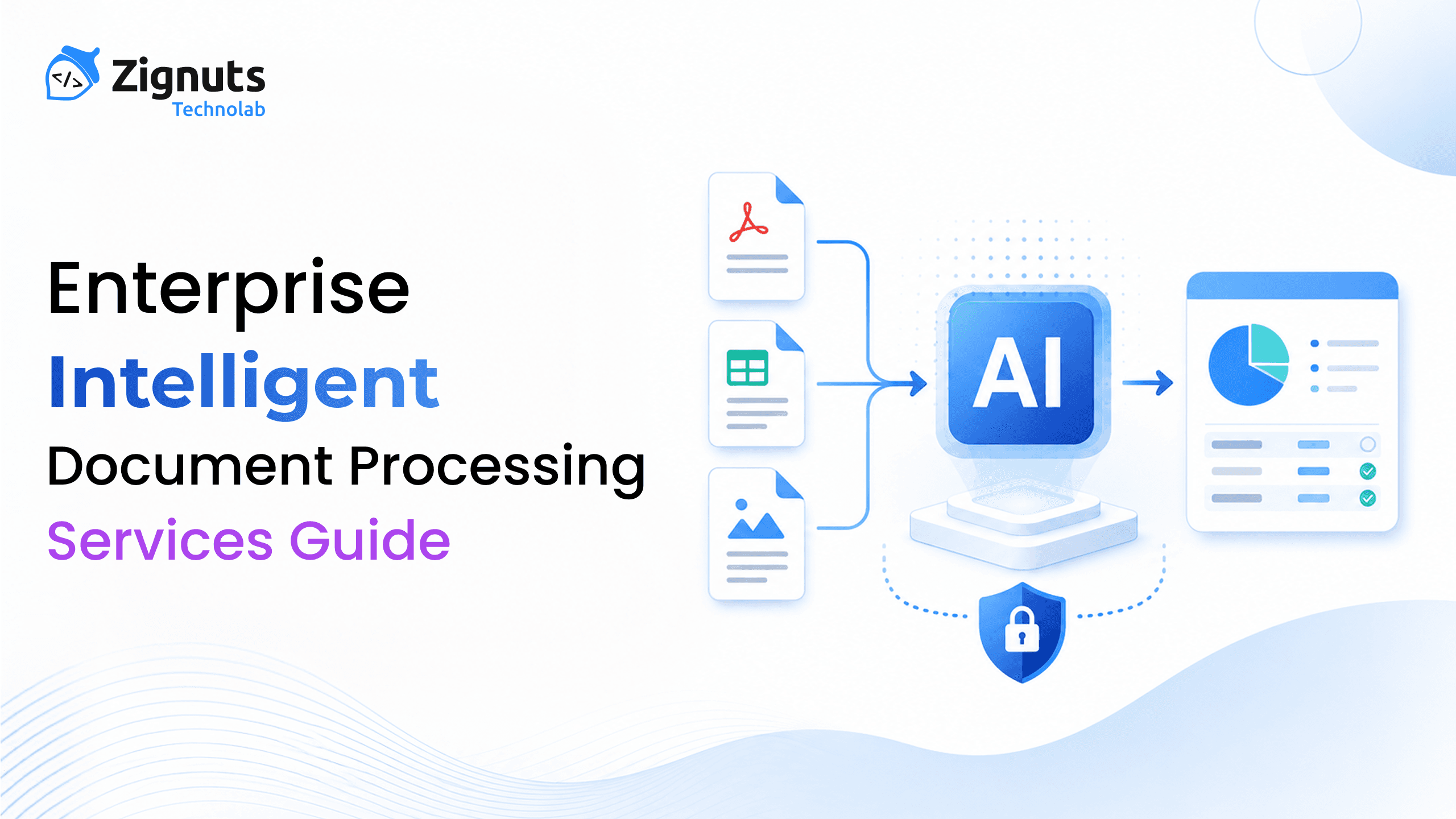
Enterprise Intelligent Document Processing (IDP) is a technology and workflow discipline for converting documents into validated, structured, and actionable information. It typically combines document ingestion, OCR and layout analysis, classification, field extraction, validation, exception handling, workflow orchestration, and integration with systems of record. Modern Intelligent Document Processing Services can also use machine learning, generative AI, and multimodal models for complex document understanding.
The enterprise opportunity is larger than replacing data entry. A well-designed IDP platform creates a control point between unstructured content and the applications that make decisions: ERP, CRM, claims, lending, procurement, HR, legal operations, case management, and analytics. That makes architecture, governance, observability, and integration just as important as model quality.
The wrong mental model
“Upload a PDF → OCR → export text.” This treats extraction as the product.
The stronger mental model
Document ↓ Understanding ↓ Validation ↓ Decision-Ready Data ↓ Controlled Action |
This treats IDP as an enterprise operating layer.
What Is Enterprise Intelligent Document Processing?
Intelligent Document Processing, often abbreviated as IDP, uses AI, machine learning, OCR, and document-understanding techniques to extract useful information from digital or scanned documents and move that information into downstream workflows. The defining characteristic is context: the system does not merely recognize characters; it identifies document type, structure, and business-relevant fields, then applies validation and workflow logic.
Microsoft’s current Document Intelligence documentation describes document analysis, prebuilt models, custom extraction and custom classification, with structured field types returned through APIs. Google Cloud’s Document AI documentation describes a similar ecosystem involving OCR, extraction, classification, splitting, custom extractors and integrations with storage, analytics and search. [
How Enterprise Intelligent Document Processing Works
For a technology buyer, a useful definition is: enterprise IDP is the controlled pipeline that turns document content into trusted business data and business actions.
Input: PDFs, images, scans, email attachments, office files, uploaded forms, and document packages.
Understanding: OCR, layout analysis, tables, key-value pairs, classification, document splitting, and semantic interpretation.
Output: typed fields, normalized entities, evidence, confidence information, and processing metadata.
Controls: validation rules, human review, permissions, audit trails, retention and exception policies.
Action: ERP posting, CRM update, workflow routing, approval, case creation, analytics ingestion, or API response.
ARCHITECT'S NOTE
The best IDP projects begin with a business workflow that has measurable pain, not with a model that happens to look impressive in a demo.
Ready to Transform Your Document Workflows?

Enterprise IDP vs. OCR, RPA, and Intelligent Automation
IDP overlaps with OCR, RPA, and broader intelligent automation, but the technologies solve different parts of the enterprise problem. The distinction matters when designing an architecture or selecting a services partner.
Technology | Primary role | Where it works well | Key limitation |
|---|---|---|---|
OCR | Convert visual characters into machine-readable text | Scanned pages, image text, basic digitization | Does not inherently understand document type or business intent |
IDP | Classify, understand, extract, validate, and route document data | Invoices, forms, statements, contracts, claims, mixed packages | Requires workflow, evaluation, and governance to become production-grade |
RPA | Automate interactions with applications and interfaces | Legacy systems, repetitive data entry, UI-based tasks | Does not solve document understanding by itself |
Intelligent automation | Combine AI, workflow, integration, and automation | End-to-end process transformation | Broad discipline; needs architecture to avoid tool sprawl |
How IDP Fits Into Enterprise Automation
A common enterprise pattern is to combine these technologies rather than choose one. IDP can understand the document, a workflow engine can make a routing decision, RPA can interact with a legacy application when no API exists, and the resulting state can be logged in an operational data store.
Why Enterprises Invest in Intelligent Document Processing
The strongest business case for intelligent document processing appears where people repeatedly inspect, re-key, classify, reconcile, or route information buried in documents. The goal is not automation for its own sake; the goal is to reduce friction while preserving business controls.
1. Improving Document Processing Throughput
Move repetitive document work from manual queues toward machine-assisted processing.
2. Improving Extraction and Processing Consistency
Apply the same extraction and validation rules across large document populations.
3. Accelerating Downstream Business Workflows
Deliver structured information to operational systems without waiting for manual transcription.
4. Improving Document Traceability and Auditability
Keep document, extracted values, review decisions, and workflow actions linked.
5. Scaling Document Processing Operations
Absorb document spikes with asynchronous processing and elastic workers.
6. Turning Documents Into Usable Business Data
Turn document content into structured information that analytics, search, and applications can consume.
What to measure
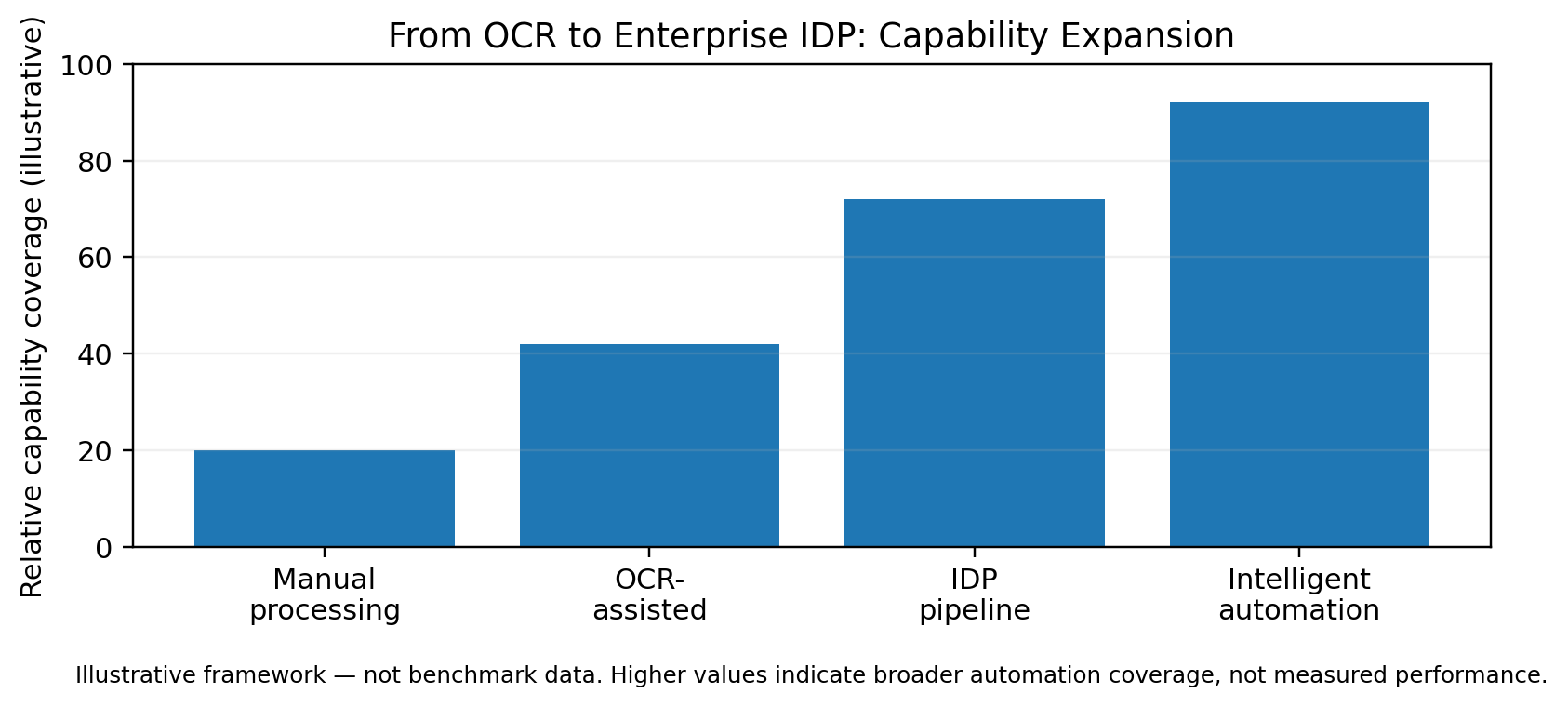
Avoid a single “AI accuracy” headline. An enterprise should define a scorecard that connects model quality to workflow quality.
Field extraction quality by document type and field.
Document classification quality and mixed-document splitting quality.
Validation pass rate versus manual review rate.
Exception reasons and recurrence.
Duplicate detection or business-rule failure rate.
Processing latency and backlog.
Downstream success rate: whether the receiving system accepted the result.
Cost per processed document or page, measured against the actual document mix.
Operational incidents, model-change impact, and audit completeness.
Ready to Transform Your Document Workflows?
How Enterprise Intelligent Document Processing Works
A production-oriented IDP workflow can be viewed as a sequence of controlled transformations. Each stage should have a clear input, output, owner, failure mode, and measurable signal.
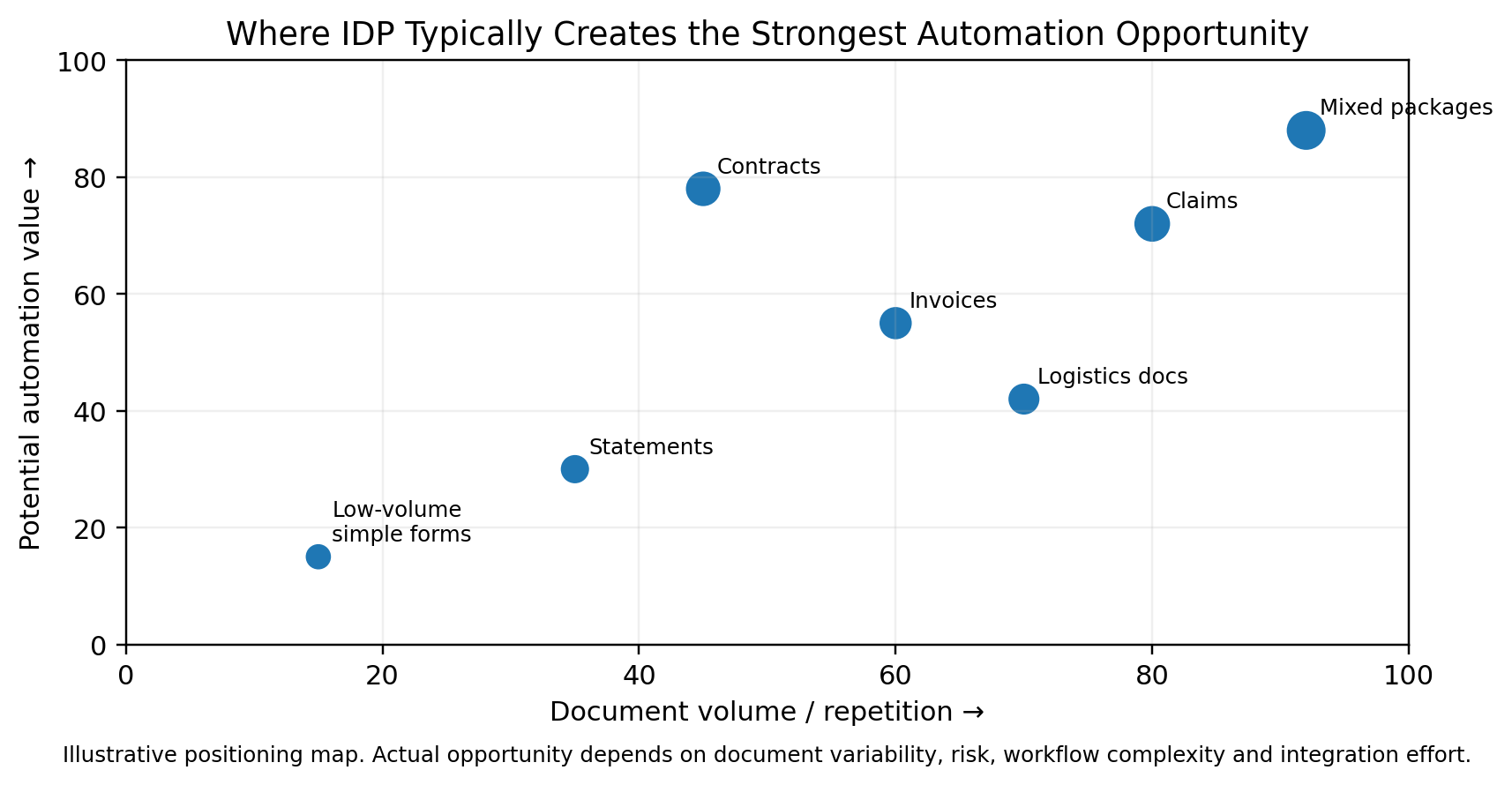
Illustrative workload opportunity map. Actual opportunity depends on volume, repetition, document variability, risk, exception rates, and integration complexity.
Stage | What happens | Enterprise design question |
|---|---|---|
Ingest | Accept documents from APIs, email, upload portals, cloud storage, scanners, SFTP, or line-of-business applications. | Can every source be authenticated and traced? |
Prepare | Validate file type, normalize images, rotate or deskew when needed, split packages, and record metadata. | Can poor-quality files be detected before inference? |
Understand | Run OCR and layout analysis to obtain text, tables, structure, and other document signals. | What document signals are required for downstream extraction? |
Classify | Determine document type and route it to the correct processing path. | Can multiple document types inside one file be separated reliably? |
Extract | Populate a defined schema with business-relevant values, entities, and line items. | What schema represents the business process? |
Validate | Combine confidence signals with deterministic rules, master-data checks, and cross-field logic. | Which rules decide whether automation is safe? |
Review | Send ambiguous or high-impact cases to a human reviewer with evidence and correction controls. | Which exceptions deserve human attention? |
Orchestrate | Approve, reject, enrich, route, notify, or create a business transaction. | What action should happen after validation? |
Integrate | Write the validated result to ERP, CRM, DMS, database, analytics platform, or API consumer. | Can the destination system accept the data idempotently? |
Enterprise Intelligent Document Processing Architecture
The reference architecture should isolate document-processing concerns from business applications. This allows teams to change extraction models, vendors, or rules without coupling the entire enterprise workflow to a single technology.
Layer 1: Document Sources and Intake Layer
Sources may include email, portals, file shares, cloud object storage, scanners, APIs, and line-of-business applications. Every incoming document should receive a unique identifier and traceable metadata such as source, timestamp, business unit, and processing policy.
Layer 2: Document Processing and Understanding Layer
Pre-processing and OCR produce machine-readable content and structural information. Classification then selects the correct extraction strategy. Google Cloud documents separate processors for classification, splitting, extraction, and layout-oriented parsing; Microsoft documents prebuilt and custom models for different document requirements.
Layer 3: Validation and Data Enrichment Layer
Raw extraction should pass through validation and enrichment before it becomes business data. For example, a supplier name can be checked against a master-data record; an invoice total can be reconciled against line items; a date can be tested against business rules. SAP’s current architecture guidance makes the same architectural point: extraction is only the first step, with enrichment used to turn extraction output into business-ready information.
Layer 4: Human Review and Exception Handling Layer
A reviewer should see the source evidence next to the extracted value, understand why the case was routed for review, make targeted corrections, and submit an auditable decision.
Layer 5: Workflow Orchestration and Enterprise Integration Layer
Workflow logic should control approvals, routing, and downstream actions. The output should be delivered to enterprise systems through APIs, events, databases, middleware, workflow platforms, or RPA where appropriate.
REFERENCE-ARCHITECTURE PRINCIPLE
Keep the model layer replaceable. Keep business rules explicit. Keep evidence and audit trails persistent.
Ready to Transform Your Document Workflows?
Core Capabilities of Enterprise Intelligent Document Processing
Capability | What enterprise buyers should expect |
|---|---|
Document ingestion | Multi-channel intake, file validation, duplicate handling, metadata and source traceability. |
OCR and layout analysis | Printed/handwritten text, tables, key-value structure, page geometry and visual elements where supported. |
Document classification | Document type detection, routing and mixed-package handling. |
Custom extraction | Organization-specific schemas, fields and document classes. |
Entity normalization | Dates, currencies, addresses, IDs and other types mapped to consistent formats. |
Confidence and evidence | Signals that help prioritize review and make results traceable to source content. |
Validation engine | Business rules, master-data checks, arithmetic checks, duplicates and cross-field consistency. |
Human review | Exception queues, correction interface, reviewer context and approvals. |
Workflow orchestration | Routing, approval, enrichment, escalation and downstream actions. |
Audit and observability | Document-level trace, model/version metadata, processing metrics, errors and alerts. |
AI and Multimodal Document Understanding for Enterprise IDP
Generative AI and multimodal models expand the range of documents an enterprise can interpret, especially when meaning depends on layout, visual structure, or relationships across long documents. Current Microsoft guidance explicitly differentiates deterministic document extraction from LLM-powered analyzers for more complex, unstructured, and multimodal content.
Choosing the Right AI Approach for Document Processing
Approach | Best fit | Strength | Trade-off |
|---|---|---|---|
Deterministic rules | Stable fields, arithmetic checks, business policies | Highly predictable and auditable | Brittle for highly variable content |
Prebuilt document models | Invoices, receipts, IDs and other common classes | Fast to adopt; purpose-built | Coverage may not match custom domains |
Custom document models | Company-specific forms and fields | Tailored extraction schema | Requires representative labeled data |
LLM / multimodal | Complex contracts, narrative documents, visual-semantic reasoning | Flexible semantic understanding | Needs stronger evaluation, guardrails and cost controls |
Hybrid pipeline | Mixed enterprise workloads | Balances control and flexibility | More architecture decisions |
AI Controls for Reliable Enterprise Document Processing
Constrain outputs to a schema rather than accepting free-form text.
Return evidence or source references for important fields.
Validate model output using deterministic business rules.
Do not let model output directly trigger privileged actions without authorization and policy checks.
Version prompts, models, schemas, and evaluation datasets.
Use human approval for high-risk or low-confidence transactions.
Evaluate on realistic edge cases: poor scans, multiple documents, handwriting, language variation, unusual tables, and adversarial content.
NIST’s AI Risk Management Framework and its Generative AI Profile provide a useful governance baseline for identifying, measuring, managing, and documenting AI risks across the lifecycle. OWASP also highlights insecure handling of model outputs as a security risk, which is particularly relevant when extracted values are passed into downstream systems.
Ready to Transform Your Document Workflows?
Human Review and Exception Management for Intelligent Document Processing
Human-in-the-loop (HITL) is not simply a fallback. It is an intentional control that directs scarce human attention toward ambiguous, high-impact, or policy-sensitive cases.
Designing Risk-Based Document Review Workflows
Confidence threshold alone is insufficient; combine confidence with transaction value, document type, policy, and business impact.
Show the original page and extracted field together.
Highlight evidence so the reviewer can verify the result quickly.
Capture corrections at the field level where possible.
Record reviewer, timestamp, reason, and disposition.
Separate “needs information” from “model error” from “policy exception.”
Feed recurring exception patterns into model, rule, or process improvements.
OPERATING MODEL
The objective is not zero human work. The objective is to reserve human work for the cases where judgement creates more value than automation.
Enterprise Intelligent Document Processing Security, Governance, and Compliance
Enterprise document data can include personal information, financial records, contracts, credentials, healthcare information, or commercially sensitive material. Security must therefore cover the document, extracted data, model interaction, and downstream action.
Control area | What good looks like |
|---|---|
Identity & access | SSO, RBAC/ABAC, service identities, least privilege |
Tenant isolation | Strict data and authorization boundaries across customers/business units |
Encryption | Encryption at rest and in transit; key management according to policy |
Data lifecycle | Retention, deletion, archival and legal hold rules |
Auditability | Document access, processing events, corrections, approvals and downstream writes |
Model governance | Model/prompt versions, evaluation results, approval and change control |
Output security | Validate/sanitize model outputs before passing them to other components [7] |
AI risk management | Use a repeatable approach to identify, measure, and manage AI risks [5] [6] |
Security Questions to Ask an Intelligent Document Processing Services Provider
Where are documents processed and stored?
What customer data is retained, for how long, and why?
Can processing be isolated by tenant, region, or business unit?
How are API keys and service credentials protected?
What logs are produced, and can they be exported to the enterprise SIEM?
How are model updates evaluated before production rollout?
Can an administrator demonstrate which user or service accessed a document and changed an extracted field?
Enterprise Document Processing Integrations and Workflow Automation
An IDP platform becomes strategically useful when it disappears into the enterprise workflow. Users should not have to copy extracted values from a document application into ERP, CRM, or a case-management system.
Integration point | Example role |
|---|---|
ERP / AP | Invoices, purchase orders, supplier details, posting support |
CRM | Customer onboarding, document metadata, account and case information |
DMS / ECM | Classification, indexing, metadata enrichment and search |
Workflow / BPM | Approval, routing, escalation and task creation |
RPA | Legacy UI automation when APIs are unavailable |
Data platforms | Validated structured data for reporting, analytics and AI applications |
Search/knowledge | Document content, metadata and evidence for enterprise retrieval |
API ecosystem | Event- or API-based integration into custom applications |
Best Practices for Enterprise Document Processing Integration
Use idempotent writes so retries do not create duplicate transactions.
Separate document state from downstream transaction state.
Carry a stable correlation ID through every processing step.
Use asynchronous events for long-running or bursty workloads.
Design retry and dead-letter handling for failed processing.
Make downstream validation explicit; successful extraction is not the same as successful business processing.
Ready to Transform Your Document Workflows?
Enterprise Document Processing Scalability, Reliability, and Observability
Document workloads can be spiky. Month-end finance operations, claims events, onboarding campaigns, or seasonal business processes may produce sudden bursts. The processing layer should therefore be designed around queues, concurrency controls, and measurable service boundaries.
Production Controls for Scalable Document Processing Systems
Queue-based processing for burst absorption.
Horizontal workers for scalable inference and transformation.
Rate limits around external model APIs.
Retry policies with exponential backoff and dead-letter queues.
Idempotency keys for document and transaction actions.
Back-pressure handling so downstream systems are not overwhelmed.
Per-stage metrics: ingestion, OCR, classification, extraction, validation, review, and export.
Alerting for backlog growth, failure spikes, model degradation, and integration errors.
Business-Level Observability for Document Processing
A dashboard that shows CPU and API latency can still miss a business failure. Enterprise IDP observability should connect technical signals to business outcomes: how many documents entered, how many passed automatically, why documents went to review, how many failed downstream validation, and what kinds of exceptions are increasing.
Enterprise Intelligent Document Processing Use Cases
Use case | Typical IDP workflow | Primary domain |
|---|---|---|
Accounts Payable | Invoice capture; supplier validation; line-item extraction; duplicate checks; ERP workflow | Finance, procurement |
Banking & Lending | KYC packages; statements; income documents; application bundles; underwriting evidence | Financial services |
Insurance | Claims forms; estimates; policy records; supporting evidence | Insurance |
Healthcare | Intake forms; referrals; administrative records; reports | Healthcare |
Legal & Contracts | Contract classification; clause metadata; obligations; matter documents | Legal |
HR | Onboarding documents; employee forms; identity records | Human resources |
Procurement | Quotes; purchase orders; supplier documents; delivery paperwork | Procurement |
Logistics | Bills of lading; proof of delivery; customs documents; freight records | Supply chain |
Choosing Intelligent Document Processing Solutions by Industry and Workflow
The extraction pattern may be similar across industries, but the control objectives differ. Financial services often require strong traceability and transaction integrity. Healthcare emphasizes privacy and access control. Legal operations need evidence and contextual review. Logistics prioritizes high-volume operational processing and integration. That difference should shape the validation policy, human-review threshold, retention design, and downstream workflow.
Enterprise Intelligent Document Processing: Build, Buy, or Hybrid Approach
There is no universal “best” deployment model. The right choice depends on document complexity, strategic differentiation, compliance requirements, integration footprint, engineering maturity, and the expected operational burden.
Model | Best fit | Advantages | Watch-outs |
|---|---|---|---|
Buy / managed platform | Common document types; speed is priority; standard extraction | Rapid implementation; less model engineering | Vendor dependency; feature and region constraints |
Build custom | Highly specialized document types; unique workflow; strong internal AI capability | Maximum control; reusable internal IP | Higher engineering, evaluation and operations burden |
Hybrid | Enterprise integration + custom rules + selected managed models | Balances speed and control | Requires architecture discipline and vendor abstraction |
BUILD-VS-BUY PRINCIPLE
Treat document AI vendors as replaceable components where practical. The enterprise-specific value often sits in schemas, validation rules, orchestration, security controls, and integrations.
Ready to Transform Your Document Workflows?
Enterprise Intelligent Document Processing Implementation Roadmap
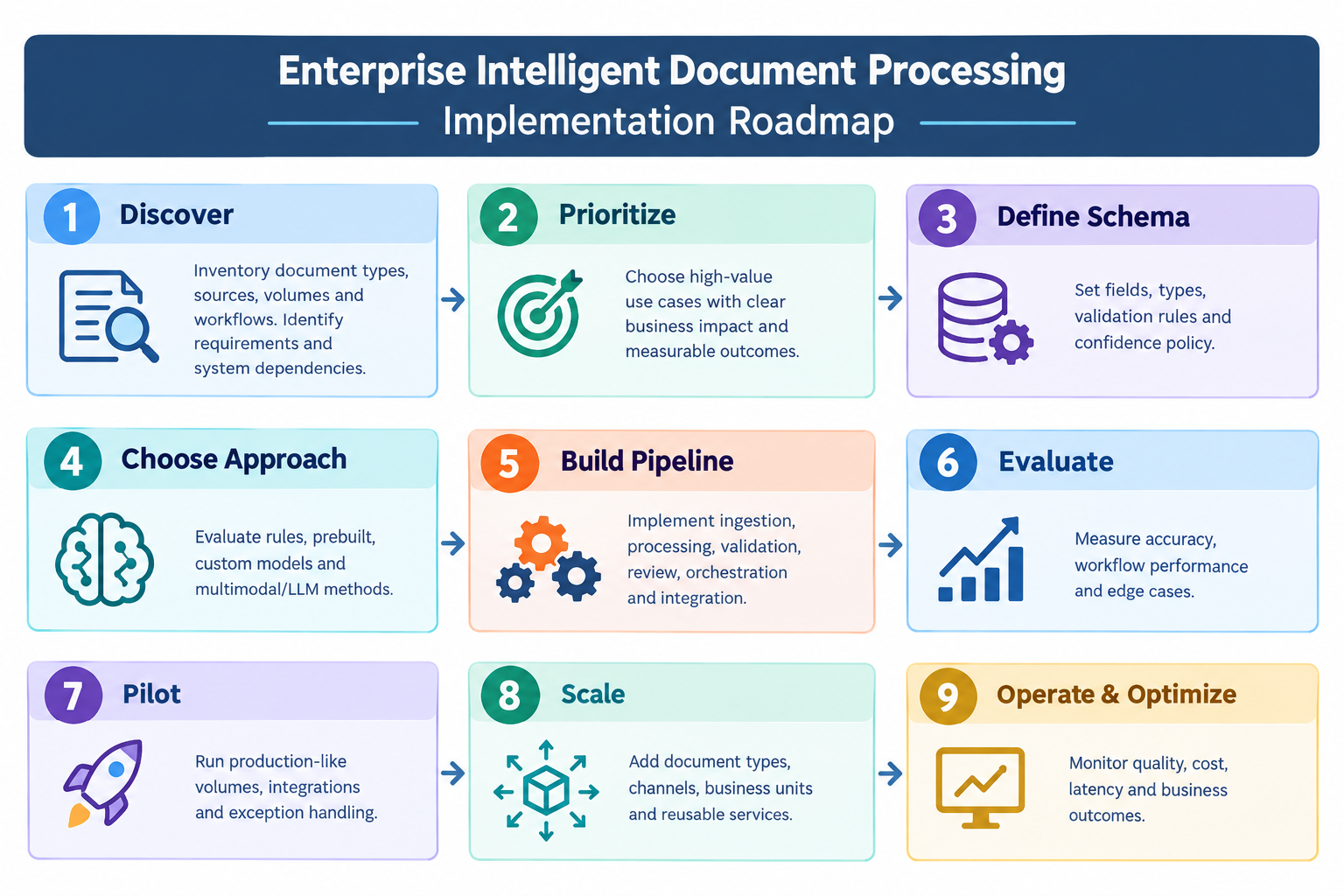
Phase 1: Discover Document Workflows and Requirements
Inventory document types, sources, volumes, layouts, workflows, exception reasons, and downstream systems. Map how documents enter the organization, where they are stored, who handles them, and what decisions or actions depend on the extracted information. Document current processing times, manual touchpoints, error patterns, approval steps, and system dependencies to establish a baseline for improvement.
Phase 2: Prioritize High-Value Intelligent Document Processing Use Cases
Choose one workflow with clear business pain, manageable exceptions, and measurable outcomes. Prioritize use cases based on document volume, processing cost, error impact, business value, data consistency, and automation potential. Define success criteria such as reduced manual effort, faster turnaround, improved extraction accuracy, higher straight-through processing, or fewer downstream errors.
Phase 3: Define the Document Data Schema
Specify fields, types, evidence requirements, validation rules, confidence policy, and downstream mapping. Define how each field should be represented, validated, and linked back to the source document. Establish required, optional, conditional, and derived fields along with confidence thresholds and rules for sending uncertain results to human reviewers.
Phase 4: Select the Right Document Processing Approach
Evaluate rules, prebuilt models, custom models, and multimodal/LLM approaches against representative documents. Compare each approach based on document variability, extraction complexity, accuracy requirements, explainability, processing cost, latency, and maintenance effort. Use representative samples, including difficult layouts and edge cases, rather than evaluating models only against clean documents.
Phase 5: Build the Enterprise Document Processing Pipeline
Implement ingestion, processing, validation, review, orchestration, integration, and observability. Connect document sources to the processing pipeline and establish clear stages for classification, extraction, normalization, validation, confidence scoring, and exception routing. Design the pipeline to support retries, audit trails, versioned processing logic, secure data handling, and integration with downstream ERP, CRM, workflow, or data platforms.
Phase 6: Evaluate Document Processing Accuracy and Workflow Performance
Measure extraction, classification, validation, review rate, workflow success, and edge cases. Evaluate accuracy at both field and document levels, while also measuring operational metrics such as processing time, exception frequency, human-review effort, failure rates, and throughput. Review false positives, missed fields, incorrect classifications, and recurring exception patterns to identify where the pipeline needs improvement.
Phase 7: Pilot Intelligent Document Processing in Production-Like Conditions
Run production-like volumes, permissions, integrations, and exception handling. Test realistic document diversity, concurrent processing, user roles, access controls, downstream system behavior, and human-review workflows. Validate operational readiness by testing failures, retries, incomplete documents, unexpected formats, integration outages, and other conditions that may not appear during development.
Phase 8: Scale Intelligent Document Processing
Add document types, channels, business units, and reusable services. Extend the platform gradually using reusable ingestion, classification, extraction, validation, and orchestration components. Introduce additional workflows only after the initial pipeline demonstrates stable accuracy, reliability, and business value. Standardize schemas, APIs, monitoring, and governance so new document processes can be added without rebuilding the architecture.
Phase 9: Operate and Optimize the Document Processing Platform
Monitor quality, cost, latency, backlog, failure modes, model changes, and business outcomes. Track performance continuously across document types, workflows, models, integrations, and business units. Use production data and exception patterns to refine validation rules, prompts, models, routing logic, and review thresholds while monitoring changes in processing costs and business results over time.
PILOT DESIGN
Pilot on a workflow, not on a technology demo. A successful pilot should prove the full loop:
Document Intake ↓ Extraction ↓ Validation ↓ Human Review ↓ Downstream Business Action |
Enterprise Intelligent Document Processing Cost Drivers and ROI Framework
Enterprise IDP pricing cannot be responsibly reduced to one universal per-page figure because costs depend on document mix, page count, extraction complexity, model choice, review rates, cloud architecture, and integration scope.
Cost driver | Why it matters |
|---|---|
Document volume | Pages, documents, peak periods, and retention |
Model consumption | OCR, document AI, LLM or multimodal inference |
Custom model work | Data labeling, training, evaluation and iteration |
Human review | Reviewer time, queue design and exception complexity |
Integration | ERP/CRM/DMS/API/workflow integration and data mapping |
Security & compliance | Private networking, encryption, IAM, audit and retention |
Infrastructure | Storage, compute, queues, observability and backup |
Operations | Monitoring, model updates, support, incident response and optimization |
A constructive ROI equation
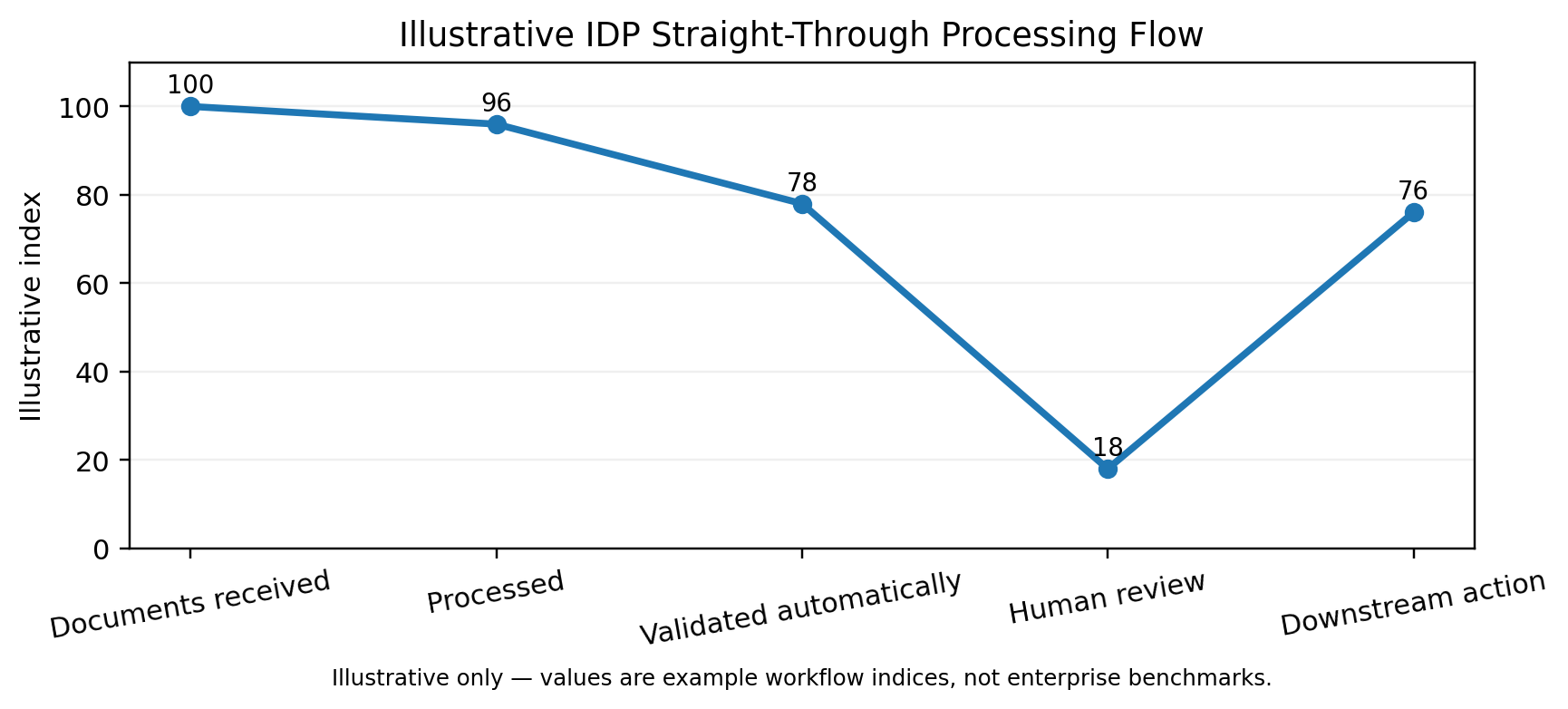
Illustrative processing-flow index. Example values are intentionally illustrative and should be replaced by measured pilot results before external publication.
A defensible business case can be modeled as:
annual value = labor capacity released + avoided manual error/rework cost + faster cycle-value + avoided operational overhead − technology and review cost. |
The exact components depend on the workflow; use measured baseline data rather than generic industry percentages.
Baseline the current process before automating it.
Measure average handling time by document class.
Separate straight-through processing from human-review cases.
Include exception and rework costs.
Include downstream transaction failures caused by bad data.
Model peak-period capacity, not only average daily volume.
Include ongoing platform and operations costs.
Ready to Transform Your Document Workflows?
How to Evaluate an Enterprise Intelligent Document Processing Services Provider
A technology partner should be evaluated on its ability to engineer the whole document-to-action workflow. The scoring model below is illustrative and should be adjusted to the enterprise’s risk profile.
Evaluation area | Illustrative weight | What to ask for | Why it matters |
|---|---|---|---|
Architecture & integration | 20% | APIs, events, ERP/CRM/DMS integration, idempotency | IDP must operate inside the existing technology landscape. |
Extraction quality & evaluation | 20% | Representative test set, field-level evaluation, edge cases | Demo accuracy is not production evidence. |
Security & governance | 20% | IAM, isolation, encryption, audit, retention, AI governance | Document data and AI outputs require controlled access and traceability. |
Workflow & human review | 15% | Exception routing, evidence, reviewer UX, approvals | Exceptions determine real operational workload. |
Scalability & operations | 10% | Queues, retries, monitoring, cost controls, resilience | Production systems must survive peaks and failures. |
AI strategy | 10% | Rules + prebuilt + custom + LLM selection rationale | The simplest reliable approach is usually preferable. |
Delivery & support | 5% | Discovery, documentation, ownership, change management | A model without change management becomes technical debt. |
Proof-of-Value Questions for Intelligent Document Processing Vendors
Can the partner process a representative batch containing normal and difficult documents?
Can it show the source evidence behind extracted values?
Can it demonstrate a low-confidence path rather than forcing silent auto-processing?
Can it show logs from document intake through downstream write?
Can it explain how a model or prompt update would be evaluated and rolled back?
Can the architecture scale without redesigning the entire application?
Common Intelligent Document Processing Implementation Mistakes
Common mistake | Constructive fix |
|---|---|
Starting with the model | Start with the process, document taxonomy, and business outcome. |
Treating OCR as IDP | Add classification, extraction, validation, review, and integration. |
Using LLMs everywhere | Use the simplest reliable model for each document class. |
Ignoring bad inputs | Build image-quality checks and preprocessing early. |
No explicit schema | Define target fields, types, evidence, and validation rules. |
No exception strategy | Design human review and queue operations before launch. |
Writing directly to ERP without controls | Use authorization, validation, and idempotent integration. |
Measuring only accuracy | Track workflow completion, review rate, failures, and business outcomes. |
No observability | Instrument every stage and preserve correlation IDs. |
Vendor lock-in by architecture | Keep business logic and schemas decoupled from provider APIs. |
Ready to Transform Your Document Workflows?
Enterprise Intelligent Document Processing Best Practices
Define a document taxonomy before selecting models.
Create a canonical extraction schema.
Keep extraction separate from authorization and business decisioning.
Combine model confidence with deterministic validation.
Preserve evidence for important fields.
Make human review a first-class workflow.
Use asynchronous processing for long-running workloads.
Make downstream actions idempotent.
Version models, prompts, rules, and schemas.
Measure quality using representative enterprise documents.
Add security, retention, and auditability from day one.
Track cost per real workflow, not only per inference call.
Document model and integration dependencies to reduce lock-in.
Treat operations, support, and change management as part of the product.
Enterprise Intelligent Document Processing: Key Takeaways
Enterprise IDP is a document-to-data-to-action architecture, not a synonym for OCR.
Classification, validation, human review, and integrations often determine the operational value of an IDP program.
The best AI choice depends on document complexity and risk; LLMs are one option within a broader architecture.
Security, auditability, and data lifecycle controls should be built into the processing path.
A strong pilot proves the full workflow, including exceptions and downstream systems.
Cost and ROI should be modeled using the enterprise’s real document mix and operating process.
The best services partner can connect AI capability with enterprise architecture, security, workflow, and integration engineering.
Conclusion
Enterprise Intelligent Document Processing is more than extracting text from PDFs. It connects document understanding with validation, human review, workflow automation, and the enterprise systems that turn information into action. The strongest IDP implementations are designed around measurable business workflows, reliable integrations, security controls, and continuous performance monitoring.
Whether the goal is to automate invoices, streamline claims, accelerate onboarding, process contracts, or improve document-heavy operations, the right approach starts with understanding your current workflow and identifying where intelligent automation can deliver measurable value.
Ready to improve your document workflows with intelligent automation? Contact us today to discuss your requirements and explore an enterprise IDP approach that fits your business processes.

Hard Trivedi
Business Enthusiast | Exploring ideas, understanding business challenges, and turning insights into practical solutions that create meaningful value and growth.